chrisb33930735
Participant
Jun 26, 2023 4:32 PM UTC
Answered

Gradients not exporting with image

Something really strange is going on. My gradients look fine when I'm editing, but when I export, it's only showing the leftmost color. I've attached images.


c.pfaffenbichler
c.pfaffenbichlerCorrect answer
Community Expert
May 21, 2025 6:25 AM UTC

Here's a better screenshot. I cannot provide the file due to copyright issues.
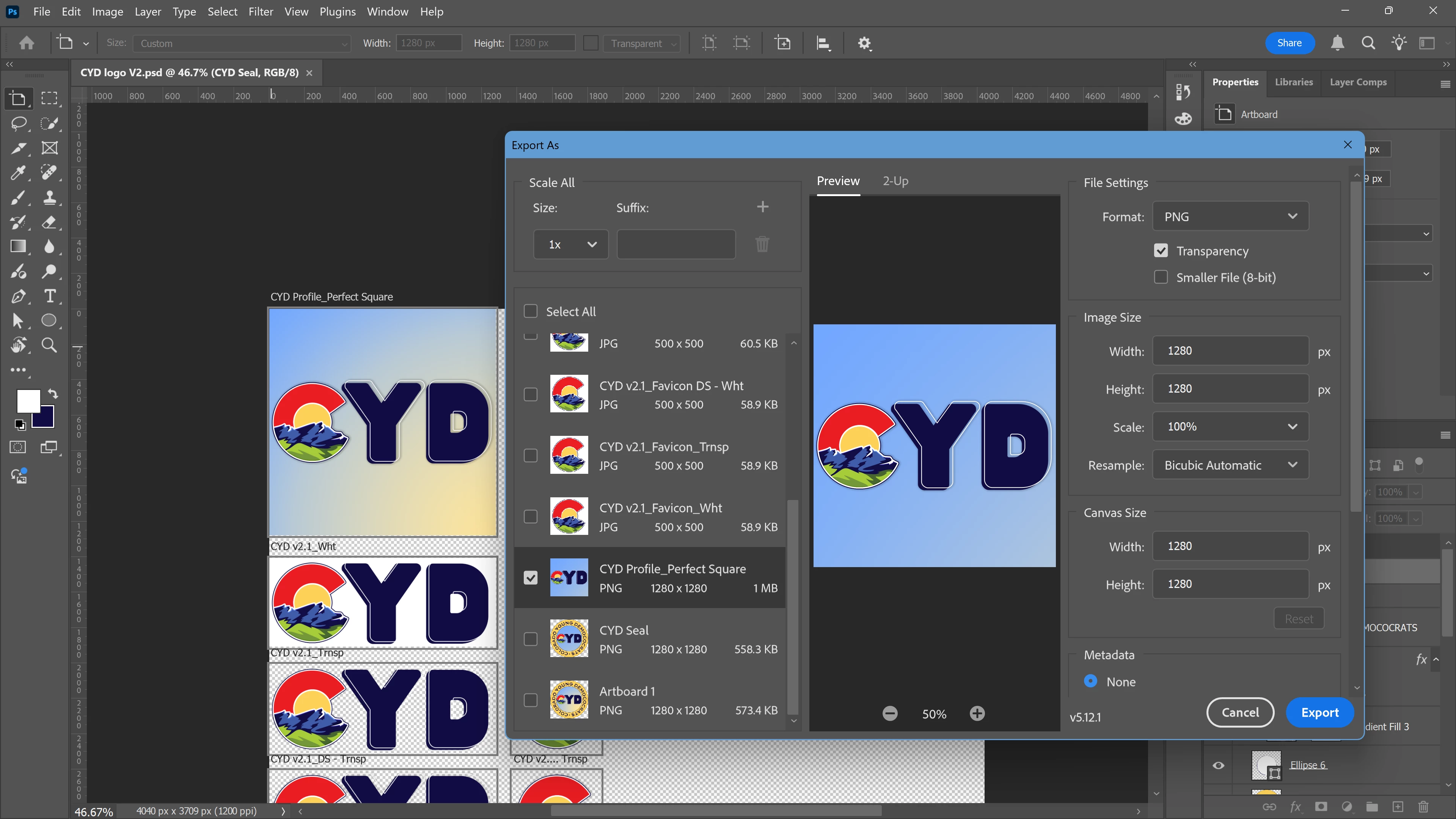


If I remeber correctly this is a known issue with »Export As«. 

In the meantime please use the work-around of applying a Layer Mask (of the Artboard’s dimensions) to the Gradient Layer or convert it to a Smart Object. 

49 replies

lottie_5808
Participant
May 1, 2026 8:40 AM UTC

       This is happening to me aswell, I have tried converted layers to smart objects, rasterized them, masked them, nothing is working. It only looks how it saves when I zoom into 100%, but is there any way to fix it and save how I see it at fit to screen?


Translate
anavic
Participant
Feb 18, 2026 2:53 PM UTC

In my case, I double-click on the gradient and mark “Align with layer”. Sometimes it moves the position of the gradient, but it respects the colour and transparency when exporting 100%

Double-click to the gradient


Translate
Participant
Aug 18, 2025 4:45 PM UTC

The soloution is to go to File > Export > Export prefrences >  click -use legagy "Export as" then save  OR  Ctrl K > Export > Export prefrences >  click -use legagy "Export as" then save. simple as that 

Translate
Participant
Apr 7, 2025 10:57 AM UTC

Same issue here

Translate
c.pfaffenbichler
Community Expert
Community Expert
Apr 7, 2025 11:18 AM UTC

Where are the screenshots? 

Translate
Participant
May 7, 2025 5:44 AM UTC

While I can't speak for the author of this reply, I can speak for myself, who is experiencing this issue. The left is the artboard and the right is the "Export As".


Translate
Participant
Feb 22, 2025 5:57 PM UTC

My workaround is to rasterize the gradient layer, and it exports properly. 

Translate
c.pfaffenbichler
Community Expert
Community Expert
Feb 22, 2025 8:36 PM UTC

Converting it to a smart object might be more prudent in case of later editing needs.

Translate
Participant
Nov 4, 2024 1:55 AM UTC

I am having the same issue, we are paying customers not getting the service that was promised to us.

Translate
Participant
Oct 31, 2024 11:10 PM UTC

Convert the gradient in a smart object.

Translate
Participant
Oct 13, 2024 7:35 PM UTC

Still Issue not solved. I am facing it from last 6 hours. Dear Team Adobe! please solve this issue.

Translate
Harry
Participant
Oct 13, 2024 7:02 PM UTC

Issue is not resolved. This happened to me today. v25.7.0

Translate
Participant
Aug 27, 2024 3:52 PM UTC

Seems like a common issue, the least destructive way I've been able to work around it is by selecting all layers and convert to a smart object, then export. Hopefully Adobe will resolve this soon.

Translate