elfwinters
Participant
Nov 14, 2017 4:44 PM UTC
Answered

Grass Brush?

Hello. I'm learning Photoshop in a practical at university where I have to create a grassy environment. The brief says "Choose the Brush Tool, and have the shape Grass. Paint a line just below the horizon. Increase the Brush Size a bit, then draw another line of grass below the previous one. Continue down the image, increasing Brush Size as you go." However neither I nor my lecturer have been able to find the Grass option. I have the latest CC 2018. Can anyone help?

Kind Regards

Emma

davescm
davescmCorrect answer
Community Expert
Nov 14, 2017 5:02 PM UTC

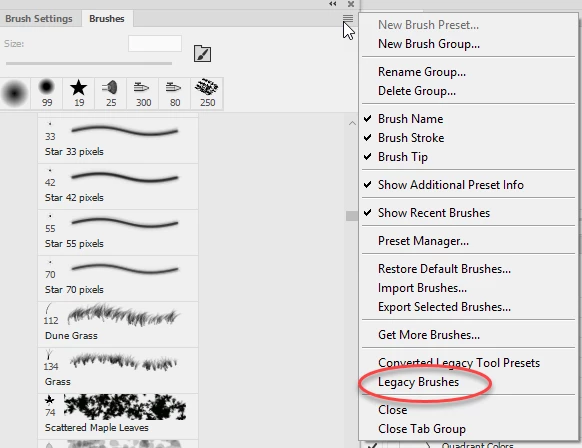
Go to the brush panel and at the top right click to open the menu. Choose legacy brushes.

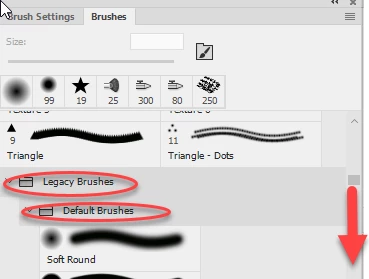
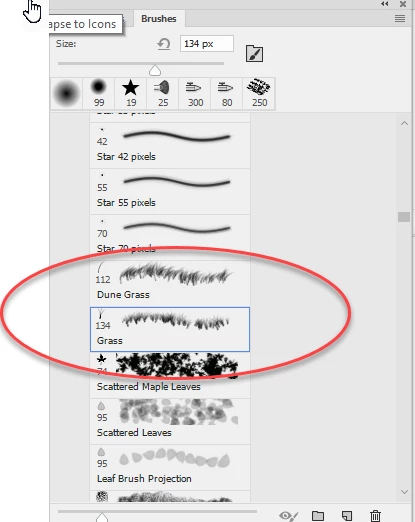
A folder will appear in your brush panel  called legacy. Within that folder is another called Default Brushes. Scroll down and the grass brush is there

Dave

5 replies

Srishti Bali
Community Manager
Community Manager
Oct 27, 2026 6:30 PM UTC

Hi All,

Great explanation by ​@davescm  For anyone looking to take their grass painting a step further, this tutorial by ​@Joseph Labrecque might also be helpful: 


It provides additional guidance on creating realistic grass effects in Photoshop, which could be useful when painting grassy landscapes and environments.

Hope this helps!

Translate
Thanks, Srishti Bali | Community & Engagement Strategist, Digital Imaging | Adobe
Participant
Dec 6, 2020 8:43 PM UTC

Thanks for the help! It solved the issue.

Translate
davescm
Community Expert
davescmCommunity ExpertCorrect answer
Community Expert
Nov 14, 2017 5:02 PM UTC

Go to the brush panel and at the top right click to open the menu. Choose legacy brushes.

A folder will appear in your brush panel  called legacy. Within that folder is another called Default Brushes. Scroll down and the grass brush is there

Dave

Translate
elfwinters
Participant
Nov 14, 2017 5:04 PM UTC

THANK YOU SO MUCH!! This has been driving me mad for the past hour. It was probably something really simple to most people so I feel kinda stupid but I can't thank you enough for solving this.

Translate