


Participant
April 25, 2025
Answered

Gray space around images when opening.

  • April 25, 2025
  • 2 replies
  • 235 views

Ok I called Adobe on this one and the guy could not figure it out and when he put me on hold to ask someone he hung up on me.  It seems like the files are all opening at 57% zoom. and this sets the image in a gray field and i have to grab the zoom tool each time and click on it to fix it. Every time i open an image. so frustrating! Can any one help. I just want the images to open with no gray around them like they used to for 20 years.

Correct answer Trevor.Dennis

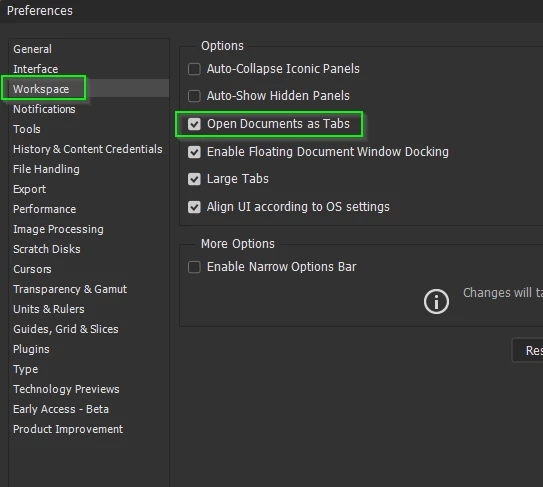
Your docs are opening as Floating Windows.

Set Open Documents as Tabs in Preferences, and all should be well  —  appart from Donald Trump and Vladimir Putin, but we did get some nice updates today.

2 replies

Trevor.Dennis
Community Expert
Trevor.DennisCommunity ExpertCorrect answer
Community Expert
April 25, 2025

Your docs are opening as Floating Windows.

Set Open Documents as Tabs in Preferences, and all should be well  —  appart from Donald Trump and Vladimir Putin, but we did get some nice updates today.

Jeff Arola
Community Expert
Community Expert
April 25, 2025

What version of Photoshop and macOS are you using?


Which model and year Mac do you have?


Could you post a screenshot of your whole screen?