
Participant
January 24, 2024
Answered

Hair Discolorization

  • January 24, 2024
  • 3 replies
  • 1143 views

Hello Everybody,


From this photo, you can see that their is some white hair discolorization on the sides that I want to fix up. I tried using a brush and eye drop, but it didn't really do the job. How would go about fixing this up in photoshop?

 

Sincerely,

Ryder
This topic has been closed for replies.
Correct answer Bojan Živković11378569

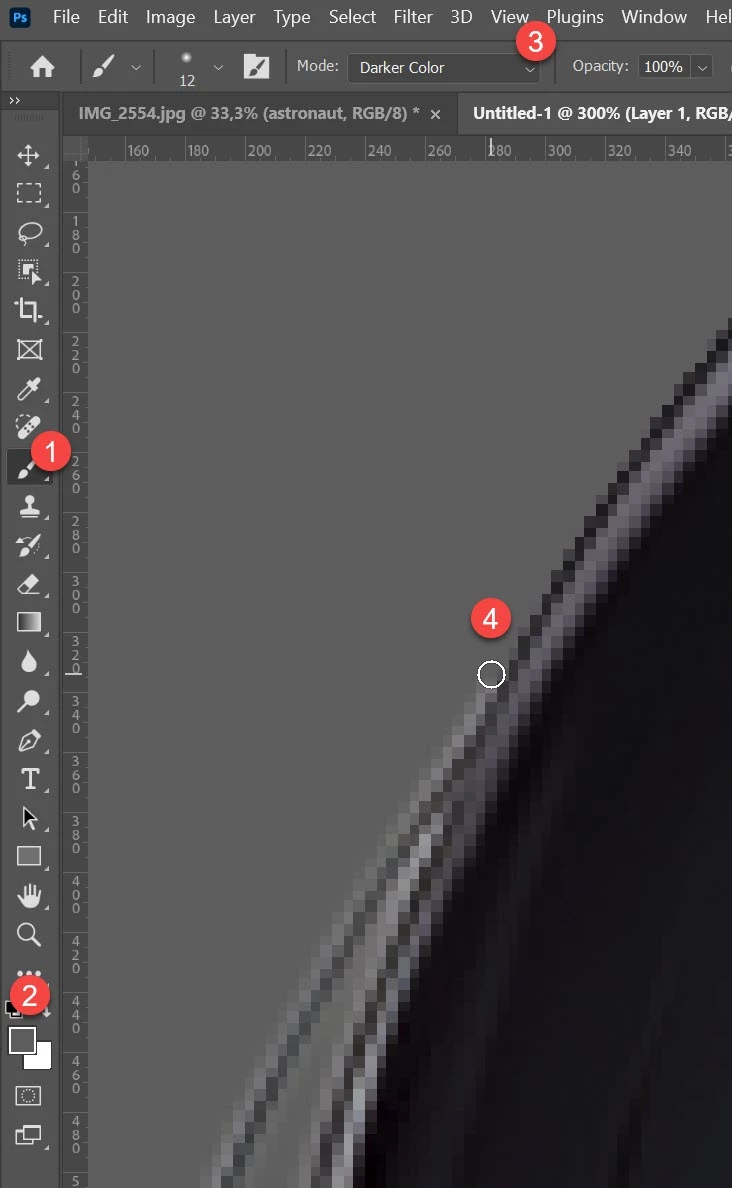
This is duplicate post. Sample grey color then paint with small brush. Set blending mode to Darker Color.

3 replies

c.pfaffenbichler
Community Expert
Community Expert
January 24, 2024

Could you please post screenshots with the pertinent Panels (Toolbar, Layers, Options Bar, …) visible? 

Participant
January 24, 2024


Participating Frequently
January 24, 2024
Participant
January 24, 2024


Hello,


As you can see from the photo, there is this weird white color that edges the entire image. How do I fix this. This really bothers me.


Sincerely,

Ryder Paredes

Bojan Živković11378569
Community Expert
Community Expert
January 24, 2024

This is duplicate post. Sample grey color then paint with small brush. Set blending mode to Darker Color.

Participant
January 24, 2024

One question. I'm trying to make the background transparent. The gray is just a background layer. Is there a way to make the brush transparent or something like that.

Bojan Živković11378569
Community Expert
Community Expert
January 24, 2024

I think you can use Brush tool set to Darker Color blend mode. Use small brush size, sample nearby color and paint.