
Inspiring
April 23, 2026
Question

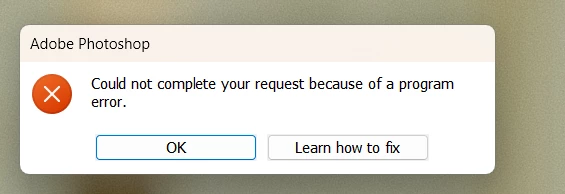
Have you decided to mess up and slow down my work again with your buggy updates?
  • April 23, 2026
  • 1 reply
  • 34 views

What is this error? I'm using Remove Tools. I wait about two minutes for it to process and start working, and then it sometimes displays this error. They’ve already screwed up Adobe Premiere, and now they’ve gone after Photoshop! Enough is enough! First your export wasn't working, and now Remove Tools isn't working.

    1 reply

    AxelMatt
    Community Expert
    Community Expert
    April 23, 2026

    Unfortunately you haven't given us any information about your system. Therefore, all proposed solutions are a look into the crystal ball.

    • Please decribe your issure more detailed.
    • What you’re trying to do and which result youR’e expected?
    • Describe the steps you’re doing so we can try to reproduce.
    • What has been changed on your system before the error occur?


    In the meantime try to reset the Photoshop preferences

    https://helpx.adobe.com/ie/photoshop/using/preferences.html#Manually

    Remember to back up your settings before doing the preference reset

    https://helpx.adobe.com/ie/photoshop/using/preset-migration.html


    If this doesn’t help provide a copy of your 'System Info'. This can be get from the Photoshop menu item Help > System Info. There's a copy button in the System Info dialog. Press this button and paste the info into a text file and attach it to your next forum post.


    My System: Intel i7-8700K - 64GB RAM - NVidia Geforce RTX 3060 - Windows 11 Pro 25H2 -- LR-Classic 15 - Photoshop 27 - Nik Collection 8 - PureRAW 6 - Topaz Photo AI