
Participant
June 27, 2017
Answered

Healing brush tool within a selection

  • June 27, 2017
  • 2 replies
  • 2469 views

Hi!

When I work with the healing brush tool on the selection border, it takes samples also from outside of the selection.

Is there any way to make it use only samples from within the selection ?

Thanks in advance!
This topic has been closed for replies.
Correct answer barbara_a7746676

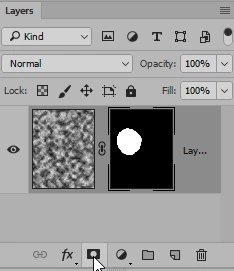
Try adding a layer mask. After you're done working with the Healing Brush, you can delete the mask.

2 replies

Vishu_Aggarwal
Participating Frequently
June 27, 2017

There is no option to make a sample with the selection of the layer.

You can make a selection than use the shortcut CTRL + J on windows or CMD + J on mac to make copy of selection in the new layer.

Set the sample option of healing brush tool to current layer  and than select the new layer which you have copied from selection to make a sample using ALT.

Now select back the layer you want to use the healing brush on.

Vishu AggarwalAdobe Certified Instructor, Professional and Expert
barbara_a7746676
Community Expert
Community Expert
June 27, 2017

Sounds like you may be using the Spot Healing brush.

Try using the Healing Brush. Hold down Option (Mac) or Alt (Windows) and click the area you want to sample. Then click or drag over the area you want to edit.

Participant
June 27, 2017

Thank for the reply! Actually, I do use healing brush tool.

barbara_a7746676
Community Expert
barbara_a7746676Community ExpertCorrect answer
Community Expert
June 27, 2017

Try adding a layer mask. After you're done working with the Healing Brush, you can delete the mask.