
HELP: Image Processor Pro & Automate outcome suddenly different
Hi there,
I really hope someone can help me bring some sense into the following issue I encountered since it has driven me nuts all weekend and I have officially no clue how to solve it:
I have a bunch of jpg images in high res and different sizes for which I wanted to do the following:
1. Resize them, so that their width is always 750px (height should adjust proportionately)
2. Add a logo to the bottom right (the logo should always be the same size on all pictures, regardless of the size of the picture)
3. Save for web
4. Add an extension to the file name so it's easily visible this picture has been edited already
I had set up the following action:
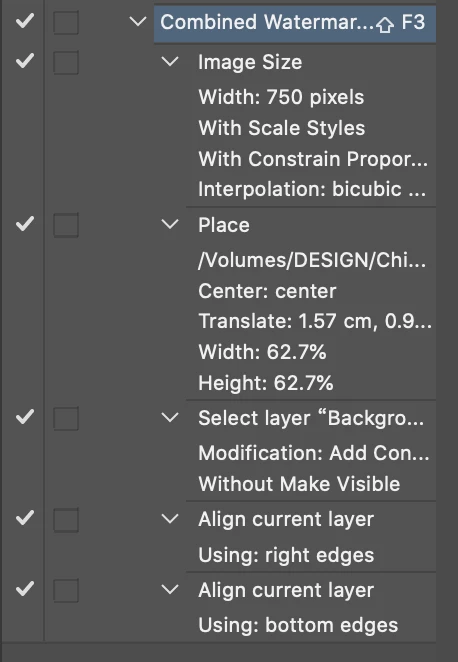
The above should: 1. Change the image size to a width of 750px, 2. Place the logo.psd file and resize it, 3. Select both layers (logo & image) 4. Align logo to the right of image 5. Align logo to the bottom of image
Then I used Image Processor Pro to save it for web and add the extension to the file name as follows:
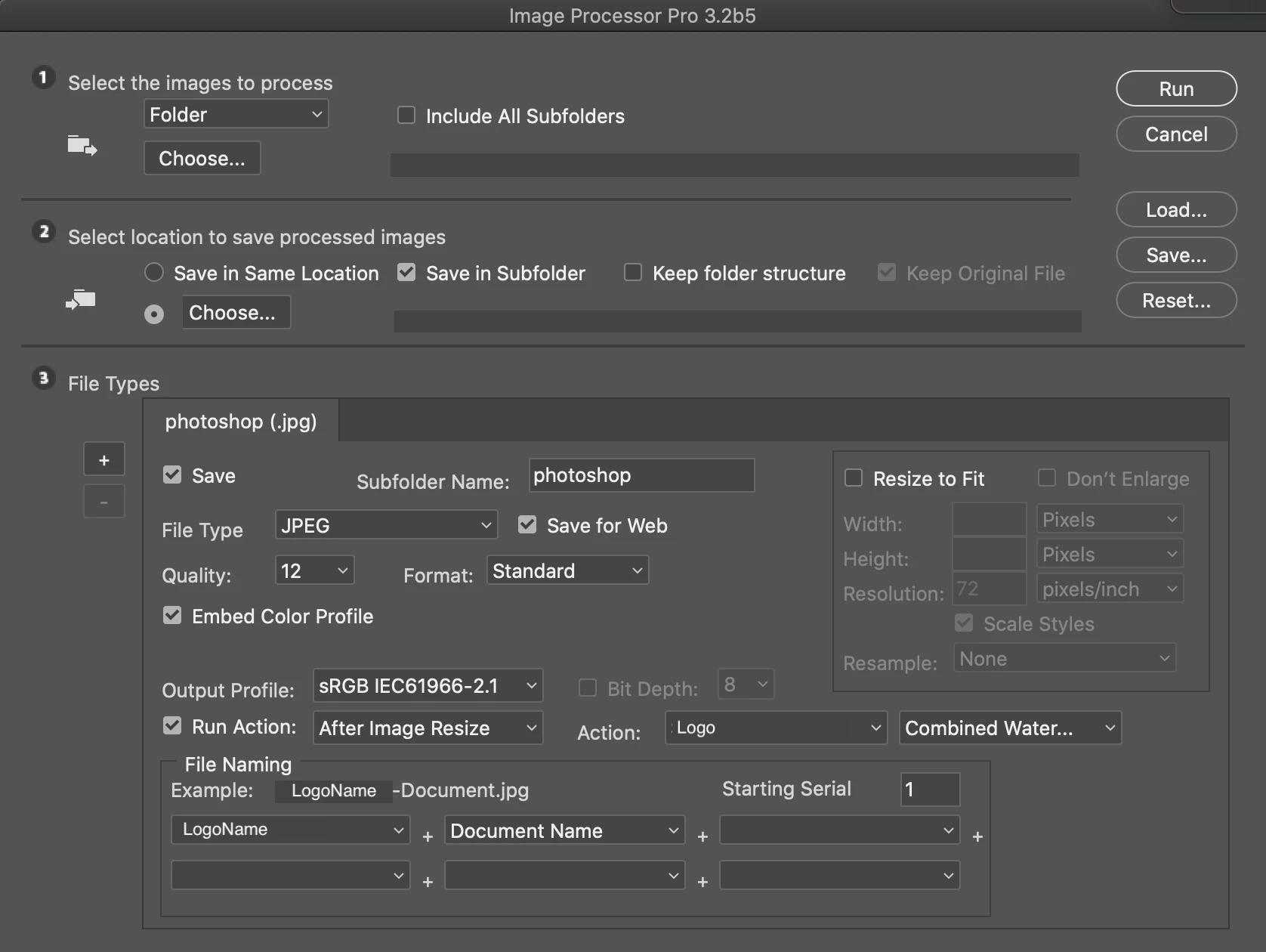
[Since I already resized the images in the action step, I don't use resize to fit in Image Processor Pro]
The above worked without any problems for 30 folders of different sizes of images, everything turned out exactly as I wanted it to and I made no changes (the action is saved, the image processor pro step is also saved).
Now suddenly as I continue with the above (all I had to do is change the name of the folder in Image Processor Pro), and the logo is off! Depending on the size of the image, it sometimes appears huge in the middle of the image, or it varies in size at the bottom right, without there being any error message whatsoever. If I didn't keep opening and double checking the generated files, I wouldn't have known that it stopped working the way it should.
I have not made changes to the logo.psd file, neither to the action or the image processor pro step, they are all saved. The only thing I am aware of doing is I restarted my computer (mac) at some point, but I am also not sure whether it stopped working right after that. I am using Photoshop 2020 if that is of any value.
I am obviously very hesitant to start a new action and redo all the steps because I have already gone through a lot of files with this setup, and if I set it up again, the outcome will not be 1:1 like what I had programmed earlier.
Does anyone have any ideas what might have caused the logo.psd file to act out all of a sudden? Honestly I was so happy when I finally figured out this setup and it worked like a gem, so that now I feel extremely lost and don't know what to do 😞 Thank you in advance for any pointers!


 AdChoices