
Participant
February 6, 2021
Answered

Help in finding sublayer option for Photoshop 2020

  • February 6, 2021
  • 2 replies
  • 2193 views

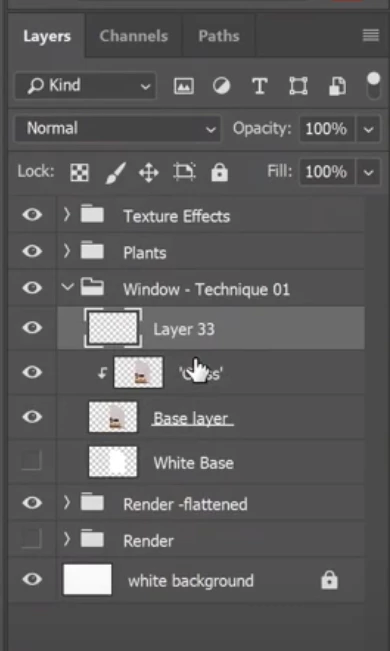
Hello, I can't seem time find how to create a sublayer in one of my layers. I tried righ clicking on the layer and on the Layer panel>New but do not see a sublayer option. Thanks for the help.
This topic has been closed for replies.
Correct answer jane-e

Hi

• The folders are groups. You can make a group by clicking the folder icon at the bottom of the panel or using the panel menu.

https://helpx.adobe.com/photoshop/how-to/photoshop-reduce-chaos-layer-groups.html

• The arrows that point downward show that there is a clipping mask

https://helpx.adobe.com/photoshop-elements/using/clipping-masks.html


~ Jane

2 replies

Participant
February 6, 2021

This piece of pottery is what I'm trying to render as glass....

jane-e
Community Expert
Community Expert
February 6, 2021

Hi @Ileana5E4E 

Photoshop does not have "sublayers" in the same way that Illustrator does. What are you trying to achieve, and maybe we can help with that.

~ Jane

Participant
February 6, 2021

I see. I'm trying to reder my object to look like glass. I found a youtube video on it and it looks like they have sublayers, but I guess I'm reading it wrong. Here's the link to the video that I'm watching: https://youtu.be/BmRUODkEJlw 

jane-e
Community Expert
jane-eCommunity ExpertCorrect answer
Community Expert
February 6, 2021

Hi

• The folders are groups. You can make a group by clicking the folder icon at the bottom of the panel or using the panel menu.

https://helpx.adobe.com/photoshop/how-to/photoshop-reduce-chaos-layer-groups.html

• The arrows that point downward show that there is a clipping mask

https://helpx.adobe.com/photoshop-elements/using/clipping-masks.html


~ Jane