
Inspiring
February 20, 2023
Question

Help: Printing from Photoshop disables choosing Colorsync for Canon printer

  • February 20, 2023
  • 5 replies
  • 6075 views

Mac, latest Ventura, Photoshop last version, Canon pro-10 printer, driver v16.70


This is driving me crazy! Somehow the choice to use ColorSync (i.e., Adobe does the color managing) or Canon is totally random. Some days ColorSync is selected and today it's Canon. Since this field is grayed out, I can't change it, I already tried rebooting, reinstalling the driver, nada....


Here is a screenshot of what I get:
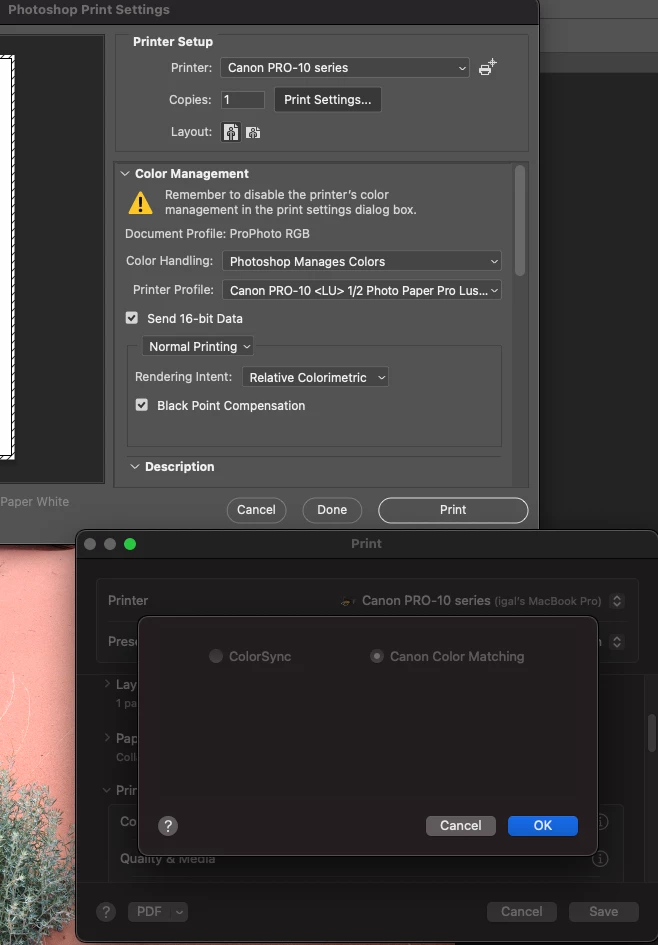
Yesterday I was printing all day and you have to believe me that Colorsync was selected; my prints were perfect. I have no idea why some gremlin decided to select "Canon Color Matching"


has anyone seen this behavior or run into this issue?

This topic has been closed for replies.

5 replies

Participant
August 6, 2024

I'm using Epson, but what I've had success in doing is temporarily setting "Printer Manages Colors" - this allows me to change the ColorSync radio buttons.

derek.o
Participant
February 25, 2024

This same exact thing is happening to me and it's driving me CRAZY. I deleted the driver, reinstalled (a few times), and then confirmed it's the latest version of the Canon Driver running (versus AirPrint) and it is. Did you ever find a solution for this?

Inspiring
February 26, 2024

My solution was to create a new user and tried ptinting from that user. That worked ~97% of the time......

Participant
February 20, 2023

Hi. I have also had awful issues since updating to Ventura 13.2.1 printing to a Canon Pro 1000. The print settings do not save, and for some reason defaults back to the Photo Paper Pro Platinum when I print, instead of the Lustre option that I print on. The presets don't save the media type of the paper size. It's an absolute nightmare. I've had this setup running for 3 years without any major issues, and can only put it down to the Ventura update. 

Inspiring
February 20, 2023

I did more digging over the weekend, and yes, it's a Ventura bug. They broke the printing system with Ventura and if you search long enough like I did, youi'll see that folks have the same problem for all kinds of printers. There are complains all over the differnt boards. 


The only thing for me left to try is to reset the printing system and reinstal the printer drivers (I'm not hopeful, I tried 80% of that already).


Like you, my printing workflow was flawless so I guess we'll have 2 options:

-wait for Apple to fix it (who knows?)

-downgrade to Monterrey (painful) 

-(borrow a windows machine and use that, or an older Mac with an OS version <=Monterrey).....


If anyone has another suggestion then please, please post here.

Participant
February 20, 2023

That is very interesting. I have also done a bit of digging like yourself and it does seem to be linked to all printer types - I think I remember seeing the same problem discussed on a Xerox printing forum. 


The weird thing is I have reset the printing system and reinstalled the software countless times while this has been happening. On some occasions it has seemed to fix the problem for a short while, and the print settings I want stick. But then all of a sudden it goes back to the same issue again and the whole issue of wasting time, ink, paper and precious business hours starts up all over again. Starting to perhaps see why some older (and perhaps wiser) guys I know say they would never use anything but a Windows computer to print from!

NB, colourmanagement
Community Expert
Community Expert
February 20, 2023

Hi @zuru7286100 I don't recommend using the Colorsync option - if you want Adobe to do the color management (I agree that's the best way) then select "Photoshop Manages Color" and choose a paper/printer profile there [having done thatColorSync should be grayed out]

Selecting Colorsync means Apple attempts to manage the colour and leaves you with confusing choices to make in the printer driver settings. 

When using Canon Color Matching the selection of media by name in the driver instigates the use of an ICC profile in the background - no use for third party media of course.


I hope this helps
neil barstow, colourmanagement net - adobe forum volunteer - co-author: 'getting colour right'
google me "neil barstow colourmanagement" for lots of free articles on colour management

Inspiring
February 21, 2023

@NB, colourmanagement 

When you print from PS or LR, the color management option under the print settings menu (down a couple of levels) has no option to select anything. So the meny is grayed out but you can see that PS forced the OS to make a choice and the one that works correctly is Colorsync. This bug in Ventura cause PS to choose Canon Color Matching randomly which creates havoc in the color management.  


To summarize, there are only 2 options in the Color Managing print setting. The whole menu is grayed out so you can't make a choice when Phosothop manages color, but this bug selects either one randomly, when only one is correct.

I should upload a screenshot to help visualize this. 

TheDigitalDog
Inspiring
February 21, 2023

For a dozen years or more, since the Apple SPI, you could never select the radio button options. Application Manages Color selects one, Printer Manages Color, the other. What is new and broken by Apple is this selection of the correct radio button.

Author “Color Management for Photographers" &amp; "Photoshop CC Color Management/pluralsight"
TheDigitalDog
Inspiring
February 20, 2023

It's a bug in Ventura. You'll just have to keep futzing around until the ratio button for ColorSync is grayed out. It should be both sticky and automatically set with "Application Manages Color" as it always was; until Ventura. 

Author “Color Management for Photographers" &amp; "Photoshop CC Color Management/pluralsight"