
Nerosetsfire
Participating Frequently
December 6, 2024
Answered

Help with script to extract subjects and paste into new document

  • December 6, 2024
  • 4 replies
  • 1328 views

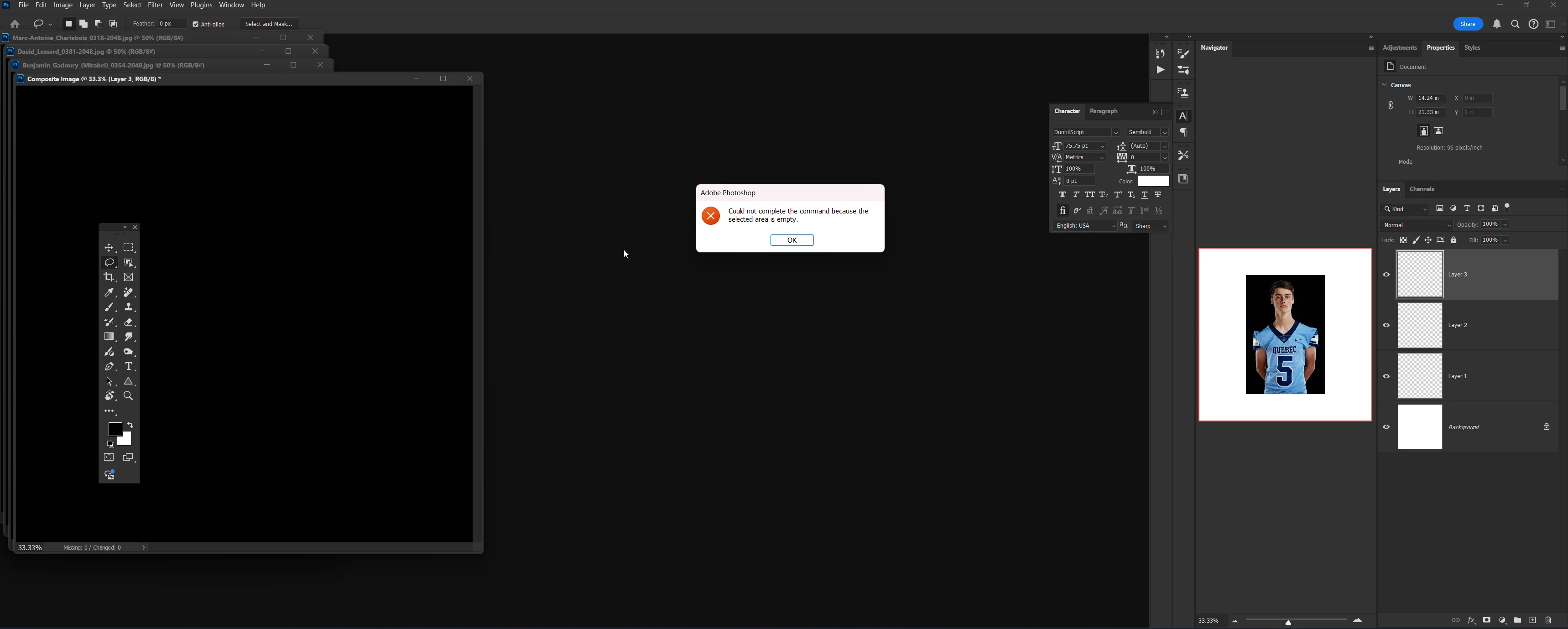
I had chatgpt write a script to take all the open documents, select the subjects and paste them into a new composite image. Each open image has only one subject on a black background. The object selection tool manages to extract it perfectly when I go through one image at a time, but I have a lot of images, so I need to make it work as a script. When I run the following script I get an error that says: Could not complete the command because the selected area is empty. Any suggestions on how to fix this? 


// Photoshop script to extract subjects from multiple open images and paste them into a new composite file
#target photoshop

// Make sure there are open documents
if (app.documents.length > 0) {
    // Create a new document for the composite
    var newDoc = app.documents.add(3000, 3000, 300, "Composite Image", NewDocumentMode.RGB);

    // Iterate through all open documents
    for (var i = 0; i < app.documents.length; i++) {
        var currentDoc = app.documents[i];
        app.activeDocument = currentDoc;

        // Make a selection of the subject
        try {
            // Use Select Subject or fallback to manual selection if Select Subject fails
            currentDoc.selection.selectSubject();
        } catch (e) {
            alert("Failed to select subject in document: " + currentDoc.name);
            continue;
        }

        // Check if selection is empty
        try {
            var bounds = currentDoc.selection.bounds;
        } catch (e) {
            alert("No subject found in document: " + currentDoc.name);
            continue;
        }

        // Copy the selection
        currentDoc.selection.copy();

        // Paste into the new composite document
        app.activeDocument = newDoc;
        newDoc.paste();

        // Move the pasted layer to arrange it better (optional)
        var newLayer = newDoc.activeLayer;
        newLayer.translate(i * 50, i * 50); // Offset each pasted subject
    }

    alert("Extraction and composite complete!");
} else {
    alert("No open documents found. Please open the photos you want to process.");
}

/*
Note:
- This script attempts to use the "Select Subject" feature and checks if the selection is valid before proceeding.
- The new composite document is created with dimensions of 3000x3000 pixels at 300 DPI. You may adjust this as needed.
- Each pasted layer is slightly offset for visibility; you can modify the `translate` function for better arrangement.
*/
 
This topic has been closed for replies.
Correct answer c.pfaffenbichler

This version should avoid the double-placement: 

// Make sure there are open documents
if (app.documents.length > 0) {
var originalRulerUnits = app.preferences.rulerUnits;
app.preferences.rulerUnits = Units.PIXELS;
var theDocs = app.documents;
var theNumberOfLayers = app.documents.length;
// Create a new document for the composite
var newDoc = app.documents.add(3000, 3000, 300, "Composite Image", NewDocumentMode.RGB);
// Iterate through all open documents
for (var i = 0; i < theNumberOfLayers; i++) {
var currentDoc = app.documents[i];
app.activeDocument = currentDoc;
// Make a selection of the subject
try {
// Use Select Subject or fallback to manual selection if Select Subject fails
executeAction(stringIDToTypeID("autoCutout"), undefined, DialogModes.NO);
} catch (e) {
alert("Failed to select subject in document: " + currentDoc.name);
continue;
}
// Check if selection is empty
try {
var bounds = currentDoc.selection.bounds;
} catch (e) {
alert("No subject found in document: " + currentDoc.name);
continue;
};
// Copy the selection
currentDoc.selection.copy();
// Paste into the new composite document
app.activeDocument = newDoc;
newDoc.paste();
// Move the pasted layer to arrange it better (optional)
var newLayer = newDoc.activeLayer;
newLayer.name = currentDoc.name;
newLayer.translate(i * 50, i * 50); // Offset each pasted subject
}
alert("Extraction and composite complete!");
} else {
alert("No open documents found. Please open the photos you want to process.");
};

4 replies

c.pfaffenbichler
Community Expert
c.pfaffenbichlerCommunity ExpertCorrect answer
Community Expert
December 7, 2024

This version should avoid the double-placement: 

// Make sure there are open documents
if (app.documents.length > 0) {
var originalRulerUnits = app.preferences.rulerUnits;
app.preferences.rulerUnits = Units.PIXELS;
var theDocs = app.documents;
var theNumberOfLayers = app.documents.length;
// Create a new document for the composite
var newDoc = app.documents.add(3000, 3000, 300, "Composite Image", NewDocumentMode.RGB);
// Iterate through all open documents
for (var i = 0; i < theNumberOfLayers; i++) {
var currentDoc = app.documents[i];
app.activeDocument = currentDoc;
// Make a selection of the subject
try {
// Use Select Subject or fallback to manual selection if Select Subject fails
executeAction(stringIDToTypeID("autoCutout"), undefined, DialogModes.NO);
} catch (e) {
alert("Failed to select subject in document: " + currentDoc.name);
continue;
}
// Check if selection is empty
try {
var bounds = currentDoc.selection.bounds;
} catch (e) {
alert("No subject found in document: " + currentDoc.name);
continue;
};
// Copy the selection
currentDoc.selection.copy();
// Paste into the new composite document
app.activeDocument = newDoc;
newDoc.paste();
// Move the pasted layer to arrange it better (optional)
var newLayer = newDoc.activeLayer;
newLayer.name = currentDoc.name;
newLayer.translate(i * 50, i * 50); // Offset each pasted subject
}
alert("Extraction and composite complete!");
} else {
alert("No open documents found. Please open the photos you want to process.");
};
Nerosetsfire
Participating Frequently
December 7, 2024

Well that's incredibly trying to do thank you very much for doing this to have your appreciate it and I have no idea and no desire how to learn to program for right script I already have enough time. Have a great day!

c.pfaffenbichler
Community Expert
Community Expert
December 8, 2024

The previous Script should also name the Layers according to the images’ names. 


A point on technique: 

In my experience »Select Subject« rarely delivers a result that doesn’t need to be amended at least somewhat. 


So if the results should not meet your expectations/needs it might be better to duplicate the individual images in their entirety, use »Select Subject« in the receiving document and apply the Selection as a Layer Mask.  

So one can edit the Layer Mask if/as necessary. 

Stephen Marsh
Community Expert
Community Expert
December 6, 2024

This is junk code:


// Use Select Subject or fallback to manual selection if Select Subject fails
currentDoc.selection.selectSubject();


Try this:


// Use Select Subject or fallback to manual selection if Select Subject fails
executeAction(stringIDToTypeID("autoCutout"), undefined, DialogModes.NO);


For more accurate, but slower selections, set your preferences/settings to use cloud processing. 

Nerosetsfire
Participating Frequently
December 6, 2024

still gave me the same error 😞

c.pfaffenbichler
Community Expert
Community Expert
December 6, 2024

Seems to work here with the correction of the garbage-line of code @Stephen Marsh recommended. 

c.pfaffenbichler
Community Expert
Community Expert
December 6, 2024

Where did you get the line 

currentDoc.selection.selectSubject();

from? 

Could it be a generative AI hallucination? 

Stephen Marsh
Community Expert
Community Expert
December 6, 2024

Can you provide links to two or more sample images exactly the same as you use for production? You can redact the faces or make them half or quarter size for testing.

Nerosetsfire
Participating Frequently
December 6, 2024
c.pfaffenbichler
Community Expert
Community Expert
December 6, 2024

How did you create the code you originally posted?