


Participant
July 15, 2026
Question

Hi there , I am quite new to photoshop and would like to ask , is it likely that Adobe will develop the place embeded command in to a multiple file facilty sometime soon (I know about the Scripts/Load file into stack ) but I want individual Layers.

  • July 15, 2026
  • 1 reply
  • 13 views

Hi there , I am quite new to Photoshop and would like to ask , is it likely that Adobe will develop the Place Embeded command into a multiple file facility sometime soon , (I know about the Srcipts/Load files into Stack) but it would be nice to have individual Layers

    1 reply

    Conrad_C
    Community Expert
    Community Expert
    July 15, 2026

    It should already work that way, at least it does on my Mac, and in two different ways:

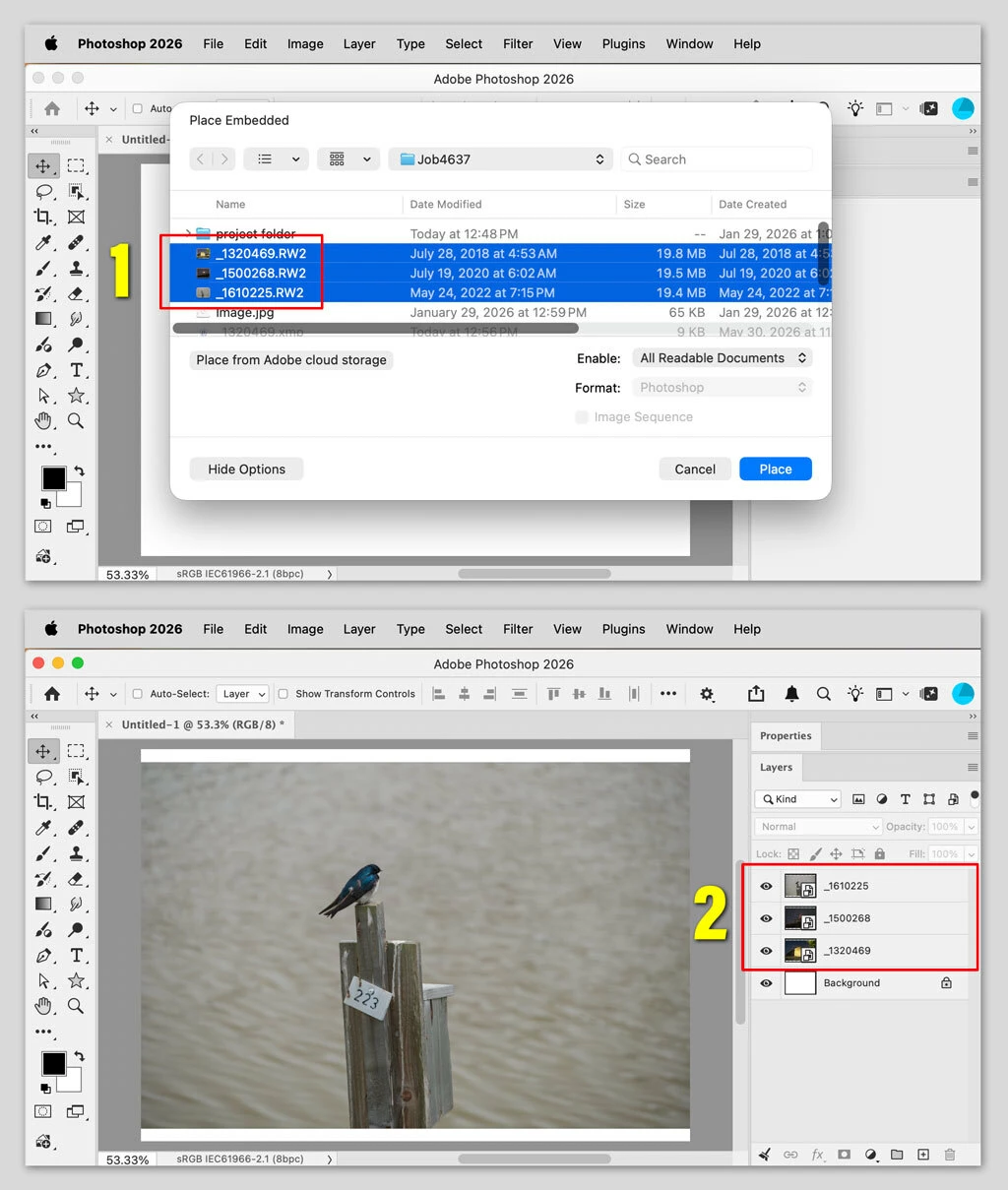
    • When using the command File > Place Embedded, select multiple images in the Place Embedded dialog box, as shown in the picture below. This also works with the Place Linked command.
    • When using drag-and-drop, just select multiple images before dragging them. 

    Either way, after you click Place or drop the drag, you will have to accept each of the files you selected. For example, if you placed one image, you commit one image (like pressing Enter). If you placed 12 images, you will have to press Enter 12 times.

    When done, each image is on its own layer, as shown in the picture below.