

NicolaCardi
Participating Frequently
Oct 12, 2021 2:53 PM UTC
Question

Hidden characters Photoshop

I have created a script to extract all texts from a huge photoshop file with several layers and layersets and put it into a csv file.

This csv file will be sent to a translator who will return me the translations which with another script (that I also coded) I am going to replace to the original ones.

Now I have a problem.

SOME text layers are composed of several lines, SOME of which, during the export get broken into two lines.

The crazy thing is that some new lines are not broken and some are.


Take the shown example (see attachments): the string is written in a single text box /text layer.

When I export it with my script I find it split in ONE of the two new lines.

Obviously the first "carriage return" is different from the second, resulting different in the exported file.
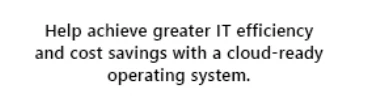
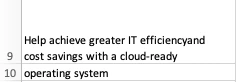
I guess this is due to  hidden characters in the text layer, but the problem is that I cannot show hidden characters. This is something very easy in Indesign , but I can't find a way to do that in Photoshop.

The question is: how do I show hidden characters in photoshop??

Thanks for your help.

Nicola

7 replies

Participant
Jan 5, 2024 4:02 PM UTC

Hello! It has been awhile since you asked your question but I need some help. I have been using Photoshop forever but all of the sudden the ability to show hidden characters (spaces, returns) in Photoshop has vanished. There even used to be the paragraph symbol that you would click to toggle them on and off. It was just there and now it is gone. Am I so frustrated that I am missing somethihng?

Translate
Participant
Jul 18, 2025 3:24 PM UTC

None of the above responses are helpful. I have the same issue onva Mac using Photoshop.

Translate
Legend
Oct 12, 2021 4:20 PM UTC

Knowing the position of the character in the string, you can use the .charCodeAt() function to understand what hidden character is in this place, for example:


var s = 'Mary\rhad a little\nlamb',
r = s.match(/\W/g);
do {
    cur = r.shift()
    if (s.indexOf(cur)!=-1) s=s.replace(cur, '(' +s.charCodeAt(s.indexOf(cur))+')')
    }
while(r.length)
$.writeln(s)


output:


Mary(13)had(32)a(32)little(10)lamb


Translate
Kukurykus
Legend
Oct 13, 2021 12:12 PM UTC

Or else:


'Mary\rhad a little\nlamb'
.replace(/\W/g, function(v){return '(' + v.charCodeAt(v) + ')'})


Translate
Legend
Oct 13, 2021 12:24 PM UTC

Cool!

As i understand that it doesn't matter what to pass to .charCodeAt if the string consists of one character:


'Mary\rhad a little\nlamb'
.replace(/\W/g, function(v){return '(' + v.charCodeAt() + ')'})


Translate
JJMack
Community Expert
Community Expert
Oct 12, 2021 3:20 PM UTC

You need to check the text and set the text tools justification  correctly and also the file encoding they send you and if there are different operating systems use the  new line character may  differ between system it look like the new line character was missed or ignored between  efficiency and and 


There are two basic new line characters: LF (character : \n, Unicode : U+000A, ASCII : 10, hex : 0x0a): This is simply the '\n' character which we all know from our early programming days. This character is commonly known as the 'Line Feed' or 'Newline Character'.

Translate
JJMack