Known Participant
December 23, 2024
Answered

Hide the layer with less color

  • December 23, 2024
  • 4 replies
  • 922 views

I have two layers of color on top of each other, is there a way to calculate and hide the layer with less or lighter color?
I would like to ask for a script to do that

This topic has been closed for replies.
Correct answer Stephen Marsh

@powerful_Zephyr5EF9 


Try the following script. It assumes the target layers are the 2nd and 3rd in the stack from the bottom. The colour of each target layer will be compared using Lab colour where the a and b values of zer0 = neutral. The layer closest to neutral will be automatically hidden.


/*
Hide Closest Layer to Neutral of Target Pair.jsx
v1.0, 24th December 2024
Stephen Marsh
https://community.adobe.com/t5/photoshop-ecosystem-discussions/hide-the-layer-with-less-color/td-p/15054871
*/

#target photoshop

try {
    // Ensure there are at least 3 layers, assuming that the target layers are the 2nd and 3rd in the stack
    if (app.activeDocument.artLayers.length < 3) {
        throw new Error("There should be a back layer and at least two additional target layers directly above!");
    }

    // Get the Back(ground) layer and the first two layers above it
    var backLayer = app.activeDocument.artLayers[app.activeDocument.artLayers.length - 1];
    var targetLayerA = app.activeDocument.artLayers[app.activeDocument.artLayers.length - 2];
    var targetLayerB = app.activeDocument.artLayers[app.activeDocument.artLayers.length - 3];

    // Get the average Lab color of each layer
    var labColor1 = getAverageLabColor(targetLayerA);
    var labColor2 = getAverageLabColor(targetLayerB);

    // Calculate the distance from neutral for each layer
    var distance1 = distanceFromNeutral(labColor1);
    var distance2 = distanceFromNeutral(labColor2);

    // Hide the layer that is closer to neutral
    if (distance1 < distance2) {
        targetLayerA.visible = false;
        var layerName = targetLayerA.name;
    } else {
        targetLayerB.visible = false;
        layerName = targetLayerB.name;
    }

    //alert('Layer "' + layerName + '" hidden!');
} catch (error) {
    alert('Error!' + '\r' + error + '\r' + 'Line: ' + error.line);
}


function distanceFromNeutral(labColor) {
    var a = labColor.a;
    var b = labColor.b;
    return Math.sqrt(a * a + b * b);
}

function getAverageLabColor(layer) {
    var samplePoint = [layer.bounds[0] + (layer.bounds[2] - layer.bounds[0]) / 2, layer.bounds[1] + (layer.bounds[3] - layer.bounds[1]) / 2];
    var sampleColor = app.activeDocument.colorSamplers.add(samplePoint);
    var labColor = sampleColor.color.lab;
    sampleColor.remove();
    return labColor;
}


https://prepression.blogspot.com/2017/11/downloading-and-installing-adobe-scripts.html


4 replies

c.pfaffenbichler
Community Expert
Community Expert
December 29, 2024

I know I am late to the thread, but maybe the performance of the Action could be improved. 


@powerful_Zephyr5EF9 , could you provide a sample image and the Action (as an atn-file)? 

Do the two Layers follow a specific naming convention or is the position-approach @Stephen Marsh used in the Script ideal anyway? 

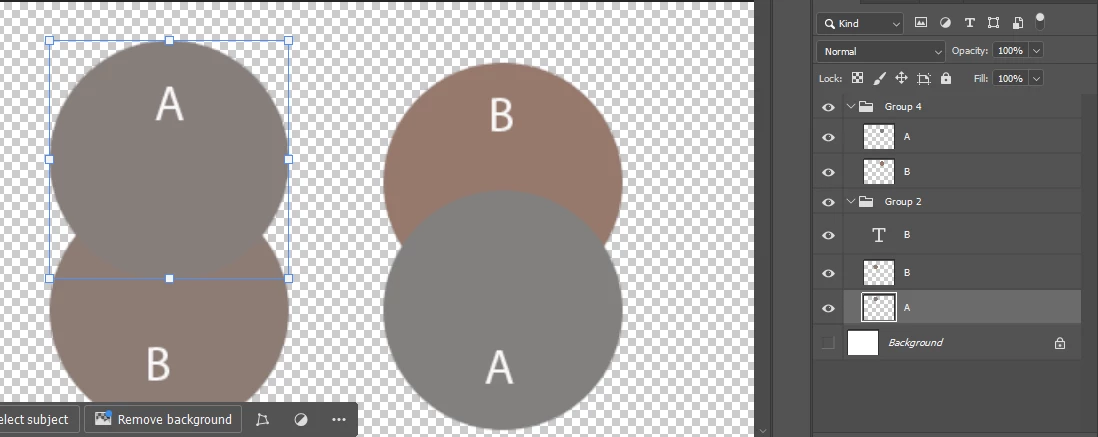
In the later screenshots the circular Layers do not seem to have an overlap – how is this handled in the Action? 

Known Participant
December 29, 2024

My needs were pretty simple, This program helped me turn off the layer that had less vibrant colors (which is a sign that less data was collected). So I kept the original program but I think you can definitely name the layer.

So far it works pretty much like I wanted.

For the action script I created two color samples from the source light and a midtone and overlaid them on two circles to select.

Stephen Marsh
Community Expert
Stephen MarshCommunity ExpertCorrect answer
Community Expert
December 23, 2024

@powerful_Zephyr5EF9 


Try the following script. It assumes the target layers are the 2nd and 3rd in the stack from the bottom. The colour of each target layer will be compared using Lab colour where the a and b values of zer0 = neutral. The layer closest to neutral will be automatically hidden.


/*
Hide Closest Layer to Neutral of Target Pair.jsx
v1.0, 24th December 2024
Stephen Marsh
https://community.adobe.com/t5/photoshop-ecosystem-discussions/hide-the-layer-with-less-color/td-p/15054871
*/

#target photoshop

try {
    // Ensure there are at least 3 layers, assuming that the target layers are the 2nd and 3rd in the stack
    if (app.activeDocument.artLayers.length < 3) {
        throw new Error("There should be a back layer and at least two additional target layers directly above!");
    }

    // Get the Back(ground) layer and the first two layers above it
    var backLayer = app.activeDocument.artLayers[app.activeDocument.artLayers.length - 1];
    var targetLayerA = app.activeDocument.artLayers[app.activeDocument.artLayers.length - 2];
    var targetLayerB = app.activeDocument.artLayers[app.activeDocument.artLayers.length - 3];

    // Get the average Lab color of each layer
    var labColor1 = getAverageLabColor(targetLayerA);
    var labColor2 = getAverageLabColor(targetLayerB);

    // Calculate the distance from neutral for each layer
    var distance1 = distanceFromNeutral(labColor1);
    var distance2 = distanceFromNeutral(labColor2);

    // Hide the layer that is closer to neutral
    if (distance1 < distance2) {
        targetLayerA.visible = false;
        var layerName = targetLayerA.name;
    } else {
        targetLayerB.visible = false;
        layerName = targetLayerB.name;
    }

    //alert('Layer "' + layerName + '" hidden!');
} catch (error) {
    alert('Error!' + '\r' + error + '\r' + 'Line: ' + error.line);
}


function distanceFromNeutral(labColor) {
    var a = labColor.a;
    var b = labColor.b;
    return Math.sqrt(a * a + b * b);
}

function getAverageLabColor(layer) {
    var samplePoint = [layer.bounds[0] + (layer.bounds[2] - layer.bounds[0]) / 2, layer.bounds[1] + (layer.bounds[3] - layer.bounds[1]) / 2];
    var sampleColor = app.activeDocument.colorSamplers.add(samplePoint);
    var labColor = sampleColor.color.lab;
    sampleColor.remove();
    return labColor;
}


https://prepression.blogspot.com/2017/11/downloading-and-installing-adobe-scripts.html


Known Participant
December 24, 2024

the program works very well, it will help me a lot.

i really appreciate your help.

Stephen Marsh
Community Expert
Community Expert
December 24, 2024

You're welcome!

Stephen Marsh
Community Expert
Community Expert
December 23, 2024

@powerful_Zephyr5EF9 


Your request isn't clear to me. Can you please explain the process? Step by step...


For example, based on your screenshot:


1) The user will manually select the lowest layer


2) The script will compare the selected layer to the layer directly above and hide whichever of the two layers has "less colour"


Or do you want to do something else? What relevance do the two groups in your screenshot have?

Known Participant
December 23, 2024

I find the neutral gray point of an image using two methods:
When the image is well exposed, neutral gray point A has more color and B has less color and is lighter.
When the image is not well exposed, neutral gray point B has more color and A has less color and is lighter.

Photos from birthday parties, graduations, or trips often contain many images with unstable exposure. so i have to click many times.

I stacked them on top of each other and created an action in Photoshop to call the curve and used the auto click program to click exactly at the point where the two layers A,B overlap.
But the new problem that arises is that when stacking, I even have to hide the mismatched layer manually.
So I want to find a way to automatically hide the inappropriate layer (the layer with less color)


Stephen Marsh
Community Expert
Community Expert
December 23, 2024

@powerful_Zephyr5EF9 


Thank you for the explanation. I feel that I should be in a better position than before, but I'm not.

Bojan Živković11378569
Community Expert
Community Expert
December 23, 2024

If you're wondering whether Photoshop actions or built-in functionality are available, the answer is no. Please wait for the scripters to respond @c.pfaffenbichler