
Participating Frequently
August 19, 2025
Answered

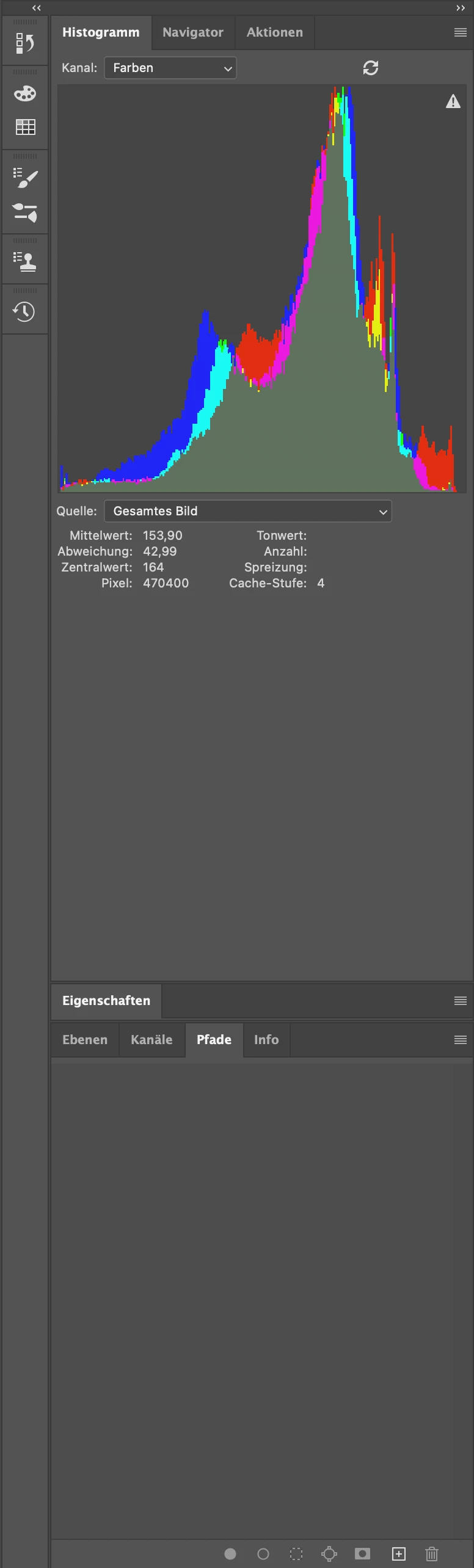
Histogram appears huge and stretched

  • August 19, 2025
  • 2 replies
  • 134 views

Hi there,

since one of the latest Photoshop updates (not quite sure which one it was) my "histogram" panel suddendly keeps appearing huge and vertically stretched (see attached screenshot). Running version 26.9.0 on iMac (macOS Ventura 13.7.7). I always have to resize the panel manually after opening new files. This problem never occured in previews versions. 

Any help would be greatly appreciated.

Thanks and best regards!
 

Correct answer Kevin Stohlmeyer

Hi @wolf_parade you can adjust the height of your panels using the tabs to slide them up or down - in this case it looks like "Eigenschaften" has been double-clicked/collapsed closing the panel making the histogram panel extend to fill the space of your docked panels. 

2 replies

Participating Frequently
September 5, 2025

Hi there Kevin,

sorry for my super late reply.

Huge thanks for your help!

Best regards

Kevin Stohlmeyer
Community Expert
Kevin StohlmeyerCommunity ExpertCorrect answer
Community Expert
August 19, 2025

Hi @wolf_parade you can adjust the height of your panels using the tabs to slide them up or down - in this case it looks like "Eigenschaften" has been double-clicked/collapsed closing the panel making the histogram panel extend to fill the space of your docked panels.
