
Participant
April 29, 2026
Answered

History panel only shows one action state for each action used

  • April 29, 2026
  • 3 replies
  • 41 views

After update, the action is just one point in the history.

I can't see all the steps.

Often, I only need to undo one or a few steps, not the entire action.

How can I change this?
    Correct answer Sameer K

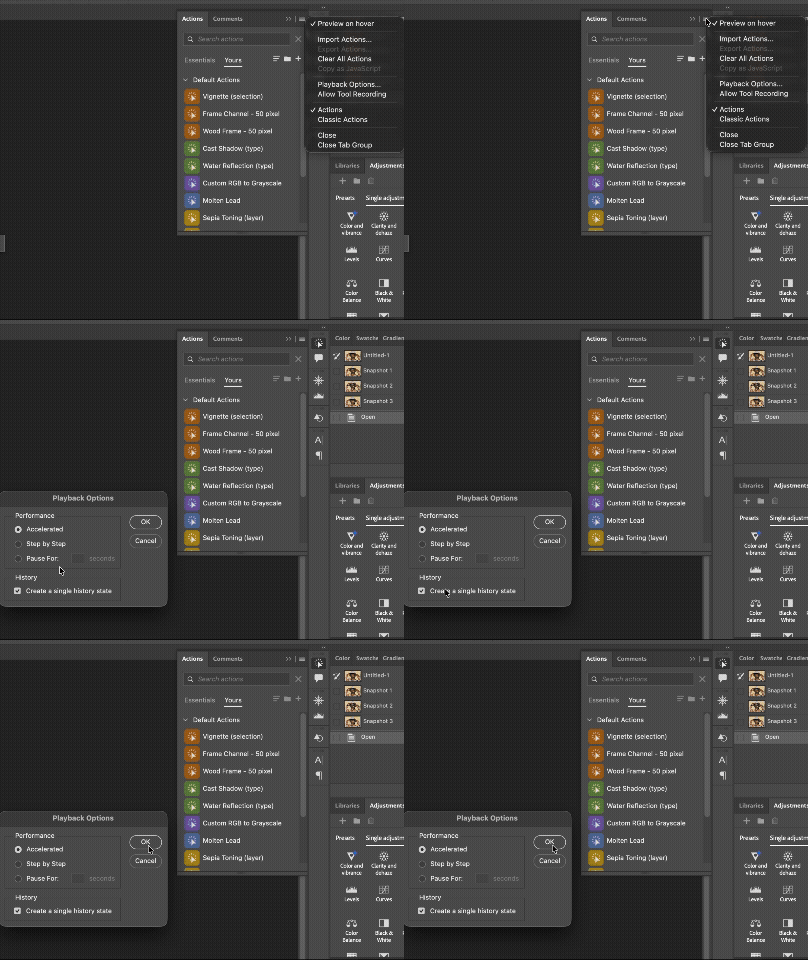
    Hey, ​@bartekbrosz. Thanks for bringing this up. Before you switch back to Classic Actions, as suggested by ​@Ged_Traynor. Try this in the Actions Panel > go to Menu > Playback Options > History > uncheck ‘Create a single history state’ > Okay, and check how it goes.


    Thanks!
    Sameer K

    3 replies

    Sameer K
    Community Manager
    Sameer KCommunity ManagerCorrect answer
    Community Manager
    April 29, 2026

    Hey, ​@bartekbrosz. Thanks for bringing this up. Before you switch back to Classic Actions, as suggested by ​@Ged_Traynor. Try this in the Actions Panel > go to Menu > Playback Options > History > uncheck ‘Create a single history state’ > Okay, and check how it goes.


    Thanks!
    Sameer K

    Participant
    April 29, 2026

    Thank You very much! 

    Participant
    April 29, 2026

    ….

    Ged_Traynor
    Community Expert
    Community Expert
    April 29, 2026

    @bartekbrosz you can change the action panel back to classic actions


    Participant
    April 29, 2026

    I've already done that. I'm talking about the history panel.

    Ged_Traynor
    Community Expert
    Community Expert
    April 29, 2026

    Sorry, I misread your original post