
Participant
December 6, 2024
Respondido

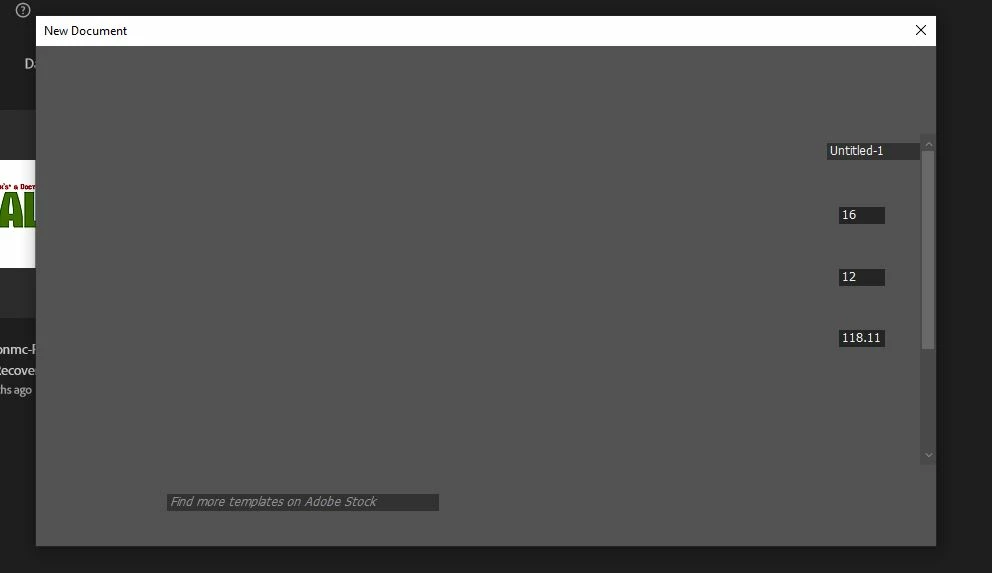
How am I able to fix my create new document page?

  • December 6, 2024
  • 1 resposta
  • 332 Visualizações

I've been dealing with this issue for awhile now and it seems to unfortunately, be across all Computer based photoshop devices linked to my account.


Ive Un Installed, Re-Installed, Updated every devices but alas My Create document folder looks like this


Is there a way to fix this?
 

Este tópico foi fechado para respostas.
Melhor resposta por Stephen Marsh

You can try reverting to the legacy new document interface in preferences, then changing it back again to see if this corrects things.


Backup your actions, brushes and other presets and reset your app preferences.


https://helpx.adobe.com/au/photoshop/using/preferences.html#backup-photoshop-preferences


https://helpx.adobe.com/au/photoshop/using/preferences.html#reset-preferences

1 Resposta

Stephen Marsh
Community Expert
Community Expert
December 6, 2024

You can try reverting to the legacy new document interface in preferences, then changing it back again to see if this corrects things.


Backup your actions, brushes and other presets and reset your app preferences.


https://helpx.adobe.com/au/photoshop/using/preferences.html#backup-photoshop-preferences


https://helpx.adobe.com/au/photoshop/using/preferences.html#reset-preferences

Participant
December 6, 2024

It worked, Thank you so much!

Stephen Marsh
Community Expert
Community Expert
December 6, 2024

Which of the two suggestions worked?!


Toggling between legacy/new interface options... Or resetting preferences?