Simonetos The Greek
Inspiring
November 2, 2021
Answered

How can I capture "Align To" into an action?

  • November 2, 2021
  • 5 replies
  • 2747 views

Is there any way to capture "Align To: Selection" or "Align To: Canvas" into an action?
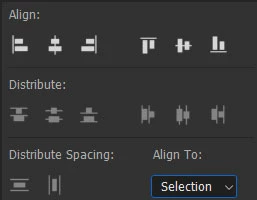
Thank you for your time!!!

Correct answer Bojan Živković11378569

Test it but I think that Photoshop will align to active selection regardless of what is set in Align To. If you want to distribute action on the internet and that is very important step, perhaps you can display stop or inform users to set that option in advance what is not strange, many action developers are doing that.


I see some suggestion to reset Move tool. Test it, I am not sure that can work and personally never have used but I have used stop at the beginning of action or at some point where some specific feature or selection is needed. With stop you can even allow user to stop playing action and set particular option then to resume playing action. Unfortunatelly this does not work for batch process.

5 replies

Bojan Živković11378569
Community Expert
Community Expert
November 3, 2021

Test it but I think that Photoshop will align to active selection regardless of what is set in Align To. If you want to distribute action on the internet and that is very important step, perhaps you can display stop or inform users to set that option in advance what is not strange, many action developers are doing that.


I see some suggestion to reset Move tool. Test it, I am not sure that can work and personally never have used but I have used stop at the beginning of action or at some point where some specific feature or selection is needed. With stop you can even allow user to stop playing action and set particular option then to resume playing action. Unfortunatelly this does not work for batch process.

Simonetos The Greek
Inspiring
November 3, 2021

This is how I'm doing it for now. I have add a "Stop" with "Allow Continue" and a message which forces user to switch to "Align to: Canvas" for example. I just was been curious why this action can't recorded!!!

Bojan Živković11378569
Community Expert
Community Expert
November 3, 2021

Canvas should be equal ot same as Select > All. If you select all it is safe to align. Even if they change something in development selection will always match canvas and you won't have problem.

Stephen Marsh
Community Expert
Community Expert
November 3, 2021

I'd just script it, the align to selection with a select all is the equivalent of canvas anyway. I have had problems with align to canvas in scripting.


Align Active Layer to Select All.jsx


// Align Active Layer to Select All.jsx

/* 
//macscripter.net/viewtopic.php?id=38890

AdLf = Align Left
AdRg = Align Right
AdCH = Align Centre Horizontal
AdTp = Align Top
AdBt = Align Bottom
AdCV = Align Centre Vertical
*/

//www.ps-scripts.com/viewtopic.php?f=66&t=7036&p=35273&hilit=align+layer#p35273

align2SelectAll('AdCH'); align2SelectAll('AdCV'); //Change as required

function align2SelectAll(method) {

   app.activeDocument.selection.selectAll();

   var desc = new ActionDescriptor();
   var ref = new ActionReference();
   ref.putEnumerated(charIDToTypeID("Lyr "), charIDToTypeID("Ordn"), charIDToTypeID("Trgt"));
   desc.putReference(charIDToTypeID("null"), ref);
   desc.putEnumerated(charIDToTypeID("Usng"), charIDToTypeID("ADSt"), charIDToTypeID(method));
   try {
      executeAction(charIDToTypeID("Algn"), desc, DialogModes.NO);
   } catch (e) { }

   app.activeDocument.selection.deselect();

}


Downloading and Installing Adobe Scripts

Inspiring
January 20, 2025

I know this is an old post - but anyways....
Your script solved the "Align to Canvas" problem perfectly! Thank you. 

But the "Select All" part is still driving me nuts. This script does not select any layers when I run it.
Even though there is a built-in keyboard shortcut for "Select" > "All Layers" (Ctrl + Alt + a); I am failing to find scripting that does that. I tried to isolate just the "Select " > "All Layers" part - but ChatGPT, Gemini and CoPilot couldn't figure it out either. I thought this would be the easy part! 

Stephen Marsh
Community Expert
Community Expert
January 20, 2025

@musekic 


You're welcome!


There is a misunderstanding.


The "clue" is in the name of the script:


Align Active Layer to Select All.jsx


The script aligns the currently selected, active layer to a Select All "marching ant" selection. The selection and deselection is automatically performed by the script, as they are simply a means to an end. An action could do the same.


So the script doesn't select any layers.


So, are you looking for legacy ExtendScript code to select all floating layers for another task? If so:


app.runMenuItem(stringIDToTypeID('selectAllLayers'));


Otherwise, like the native command or action recording, select all layers will not include a special Background layer, extra steps are required for that (not my code):


selectAllLayers(true); // Change to false to also select the Background layer

function selectAllLayers(ignoreBackground) {
  // Select all layers (doesn't include Background)
  try {
    var desc = new ActionDescriptor();
    var ref = new ActionReference();
    ref.putEnumerated( charIDToTypeID('Lyr '), charIDToTypeID('Ordn'), charIDToTypeID('Trgt') );
    desc.putReference( charIDToTypeID('null'), ref );
    executeAction( stringIDToTypeID('selectAllLayers'), desc, DialogModes.NO );
  } catch(e) {}
  if ( !ignoreBackground ) {
    // Add Background Layer to the selection (if it exists)
    try {
      activeDocument.backgroundLayer;
      var bgID = activeDocument.backgroundLayer.id;
      var ref = new ActionReference();
      var desc = new ActionDescriptor();
      ref.putIdentifier(charIDToTypeID('Lyr '), bgID);
      desc.putReference(charIDToTypeID('null'), ref);
      desc.putEnumerated( stringIDToTypeID('selectionModifier'), stringIDToTypeID('selectionModifierType'), stringIDToTypeID('addToSelection') );
      desc.putBoolean(charIDToTypeID('MkVs'), false);
      executeAction(charIDToTypeID('slct'), desc, DialogModes.NO);
    } catch(e) {}
  }
}
Legend
November 2, 2021

reset moveTool ==> align to selection

Kukurykus
Legend
November 2, 2021

Reset the tool, how? But still that's only one direction, how then to set 'canvas'?

Kukurykus
Legend
November 2, 2021

You want to record only swtiching between Selection and Canvas?


btw was a code from me in above thread that you looked for:

Simple script which gives current date to a specific text layer.

Simonetos The Greek
Inspiring
November 2, 2021
quote

You want to record only swtiching between Selection and Canvas?

By @Kukurykus

Yes, "record only switching between Selection and Canvas" is exactly what I want to do!!! Can I do that using an action?

quote

btw was a code from me in above thread that you looked for:

Simple script which gives current date to a specific text layer.


By @Kukurykus

Is in there a code about swtiching between Selection and Canvas???

Kukurykus
Legend
November 2, 2021

With action you can't do that. With scripting I doubt but you can align to selection / canvas.


The other thread you've created for other problem. After my answer you marked it as correct solution, but then someone unmarked it. I don't know who, maybe you for some reason? Now it's remarked but maybe unnecessarily?

JJMack
Community Expert
Community Expert
November 2, 2021

Actions can not Capture things they are recorded steps with settings. Action can use Align to Alignmnent The alignment will be recorded into the action step's settings.


Menu Layer>Align Layers to Selection>Alignment 

JJMack
Simonetos The Greek
Inspiring
November 2, 2021

Ok with capture I mean the record action, excuse me!!!
There is no such option in the Layer menu...

JJMack
Community Expert
Community Expert
November 3, 2021

Did you have an Active selection  when  you tried to Record Align Layers to selection? Was there a selection to align to?

JJMack