Participant
February 6, 2023
Answered

How can I deselect a selection by clicking outside the selection

  • February 6, 2023
  • 1 reply
  • 6357 views

I was used to clicking outside a selection to deselect it, but somehow it doesn't work anymore. Now I need to click CMD-D to deselect but I want to get back to just clicking outside it. I can't find what to reset to be able to do this? Or did something change?


Thx

Correct answer Kevin Stohlmeyer

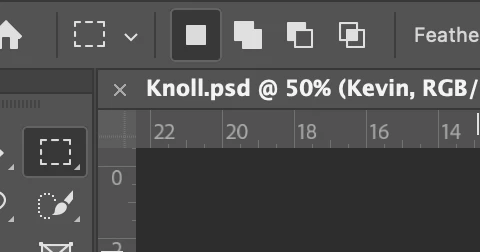
Check your options toolbar - are you on the New Selection option or do you have one of the other options like add to or subtract from selection?


1 reply

Kevin Stohlmeyer
Community Expert
Community Expert
February 6, 2023

Hi @Bart22088732jd2y It depends on what selection tool you are using.

The standard lasso tool and marquee tools allow you to deselect by clicking outside your selection, but the other tools like Quick Select, Magic Wand, Polygonal Lasso, etc. will either add to your current selection or start a new selection based on the nature of the tools.


Participant
February 6, 2023

Hi Kevin, thanks for your reply. It's actually the rectangular marquee tool. It was easy to deselect before but now I can't seem to find how to deselect by clicking outside anymore. Feels like I accidently hit a setting and I don't know which. By the way, every time I draw another marquee selection it just adds to the other one.

Kevin Stohlmeyer
Community Expert
Kevin StohlmeyerCommunity ExpertCorrect answer
Community Expert
February 6, 2023

Check your options toolbar - are you on the New Selection option or do you have one of the other options like add to or subtract from selection?