Participant
March 28, 2024
Answered

How can I get the currently missing "lighting effects" command?

  • March 28, 2024
  • 2 replies
  • 577 views

I have not been able to take advantage of the "Filter - rendering - lighting effects" command for a long time. How can I remedy this?

This topic has been closed for replies.
Correct answer Kevin Stohlmeyer

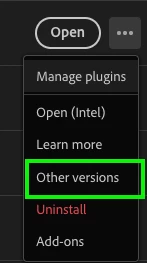
@Marina287152478xci go to Creative Cloud Desktop app>Apps>Photoshop. Click the ellipse (...) button and choose "Other Versions"
 

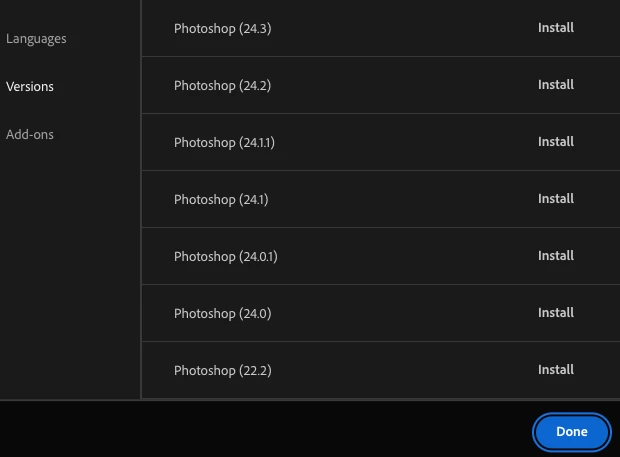
Photoshop 22.2 will be at the very bottom of the list:
 

2 replies

Trevor.Dennis
Community Expert
Community Expert
March 29, 2024

You don't need to mess about with previous versions.

Ged_Traynor
Community Expert
Community Expert
March 28, 2024

@Marina287152478xci 3D features are being discontinued in Photoshop and this includes lighting effects, if you want to continue using 3D features you can install version 22.2 which is available from the Creative Cloud app
https://helpx.adobe.com/ie/photoshop/kb/3d-faq.html

Participant
March 28, 2024

Photoshop 22.2 cannot be found in the Creative Cloud. How to go about getting it?

Kevin Stohlmeyer
Community Expert
Kevin StohlmeyerCommunity ExpertCorrect answer
Community Expert
March 28, 2024

@Marina287152478xci go to Creative Cloud Desktop app>Apps>Photoshop. Click the ellipse (...) button and choose "Other Versions"


Photoshop 22.2 will be at the very bottom of the list: