Known Participant
October 3, 2025
Answered

How Can I Set a Brush to Exactly 90° (or Other Precise Angles) in Preset Mode?

  • October 3, 2025
  • 2 replies
  • 219 views

Hello guys, I know is pretty awkward what I'm asking and I'm sorry to bother a big community for this... but how can I set once I'm using a brush in a preset mode to a 90°precisely ? Is there a way to set the brush or a keyboard shortcut? Even when I open up the brush setting window, I can choose plenty of different settings but I cannot turn it into 90°, or 180° or whatever degrees... maybe there's a an hidden path to it. Thank you 

Correct answer Trevor.Dennis

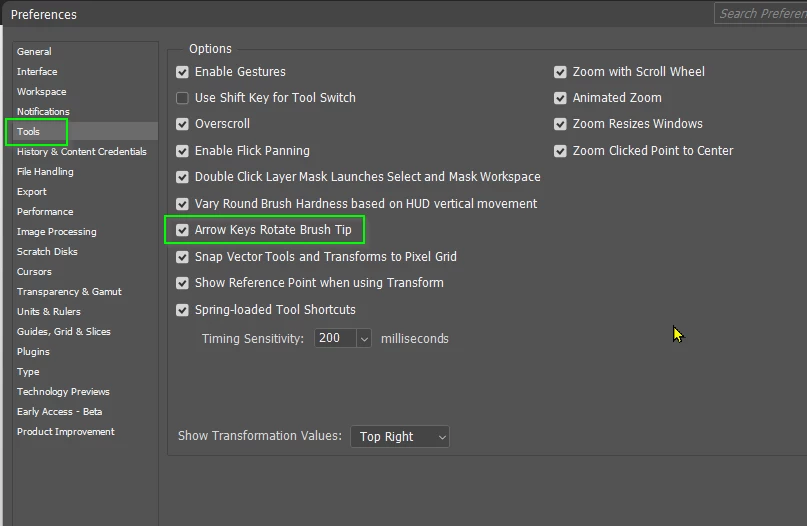
So long as you have this preference setting enabled, the cursor keys will rotate 15° if you hold down the Shift key.


If this is something you do a lot with a specific preset, then maybe make new presets, and access them via Recent Brushes from the right click menu.  It's touch and go whether this would be quicker than rotating with the cursor keys.


That's all I can think of right now.

2 replies

Trevor.Dennis
Community Expert
Trevor.DennisCommunity ExpertCorrect answer
Community Expert
October 3, 2025

So long as you have this preference setting enabled, the cursor keys will rotate 15° if you hold down the Shift key.


If this is something you do a lot with a specific preset, then maybe make new presets, and access them via Recent Brushes from the right click menu.  It's touch and go whether this would be quicker than rotating with the cursor keys.


That's all I can think of right now.

NC9977NCAuthor
Known Participant
October 11, 2025

Thank you 🙏 

Legend
October 3, 2025

The trick is reading the hover hints.

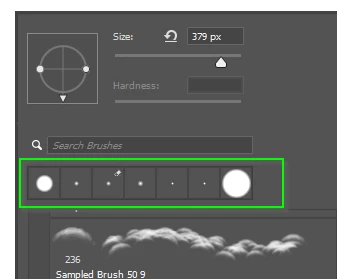
Click to open the Brush Preset picker ( the second drop-down to the right of the Home icon).

Once the picker is open, pick a brush, then adjust the brush angle and roundness in the box that contains a facsimile of a brush. The two dots allow one to stretch the circle into an oval; grab the triangle to move the brush to the desired angle. Experiment with holding the Shift key as you turn the shape.

See my screen recording.


Larry
NC9977NCAuthor
Known Participant
October 3, 2025

The shift key while I rotate the arrow inside the box. I've tried but maybe my Italian keyboard isn't working as the US one. 
anyway thank you .. I will try to add an USA keyboard and see. 

CMass
Community Manager
Community Manager
October 3, 2025

Hey @NC9977NC

Let us know if you're able to use the shift key. Glad Lamy2017's response helped. 


^CM