


Participant
October 31, 2017
해결됨

How can I transfer or copy an entire group of layers from one photoshop document onto a new photoshop document?

  • October 31, 2017
  • 4 답변들
  • 51691 조회

I want the layers within the group to remain editable after I  transfer the group onto a new photoshop doc, but I do not know how without exporting the group as a PNG or other type of file which I am trying to avoid.

I'm creating a flyer to be printed as a PDF and have one group for the front, and one group of layers for the back. Somehow I created these on an Artboard that is not allowing me to change the canvas size, so when I initially tried to export it as a PDF theres a huge white space around all the edges of the document and it is the incorrect size for printing. So to avoid this, I created a new correctly sized document, but don't know how to get my layers/groups onto the new photoshop file. Hope this makes sense. Please advise.
이 주제는 답변이 닫혔습니다.
최고의 답변: Bojan Živković11378569

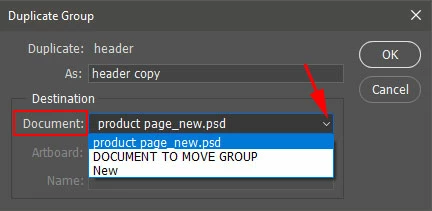
There is also option to duplicate group with its content using Duplicate Group command. Here are steps:

  • Select group in the Layers panel.
  • Right click on group and choose: Duplicate Group. Alternatively go to Layer > Duplicate Group.
  • In Duplicate Group dialog choose from Document drop-down list in which document you want to duplicate selected group. It can be any open document or even to create brand new document using New command at the bottom of drop-down list.

4 답변

melissapiccone
Community Expert
Community Expert
October 31, 2017

You can also combine the layers into a smart object and just move that over. Select the layers, right click to convert - now you have a single layer to move and completely editable - just click on the layer thumbnail to edit.

Melissa Piccone | Adobe Trainer | Online Courses Author | Fine Artist
Bojan Živković11378569
Community Expert
Community Expert
October 31, 2017

There is also option to duplicate group with its content using Duplicate Group command. Here are steps:

  • Select group in the Layers panel.
  • Right click on group and choose: Duplicate Group. Alternatively go to Layer > Duplicate Group.
  • In Duplicate Group dialog choose from Document drop-down list in which document you want to duplicate selected group. It can be any open document or even to create brand new document using New command at the bottom of drop-down list.

jane-e
Community Expert
Community Expert
October 31, 2017

A slight variation to Barbara's excellent instructions are:

With the Move tool, press the mouse down on the selected Layers or the Layers group in the Layers panel and drag into the other file.

Adobe Employee
October 31, 2017

Copy and Paste of Layers in now supported in Photoshop CC (2018)

Select the Layers/Group in the Layers panel

command/control C to copy (Edit/Copy)

navigate to the destination document (can also be the source doc)

Command V to paste the Layers/Group (edit/Paste)

barbara_a7746676
Community Expert
Community Expert
October 31, 2017

Open both documents.

Choose Window > Arrange > 2 Up (either vertical or horizontal).

Make your active document the one that has the layers/group you want to copy.

Highlight the layers/group in the Layers panel. If you need to, you can highlight multiple layers or multiple groups.

With the Move tool, press down on the image. Drag all the way into the file you want to copy them into. Do not release the mouse until your cursor is inside the file you're copying into. If you hold down Shift while dragging, when you release the mouse the layers/group will be centered on the canvas.