
Question
How can I turn these steps into an action?
These are the steps I want to turn into an action. I have bolded the step that I cannot figure out how to turn into an action, I only have a portion of the steps recorded.
- Copy subject layer
- Convert to Smart Filter (Blending Mode: Overlay)
- Filter > High Pass
- Adjust value until you can see the dark circles
- Create new blank layer UNDER the new subject layer
- Clip copied subject layer to blank layer
- Brush tool (Color: Brighter skin ton, Flow: 5%)
- Paint over dark circles
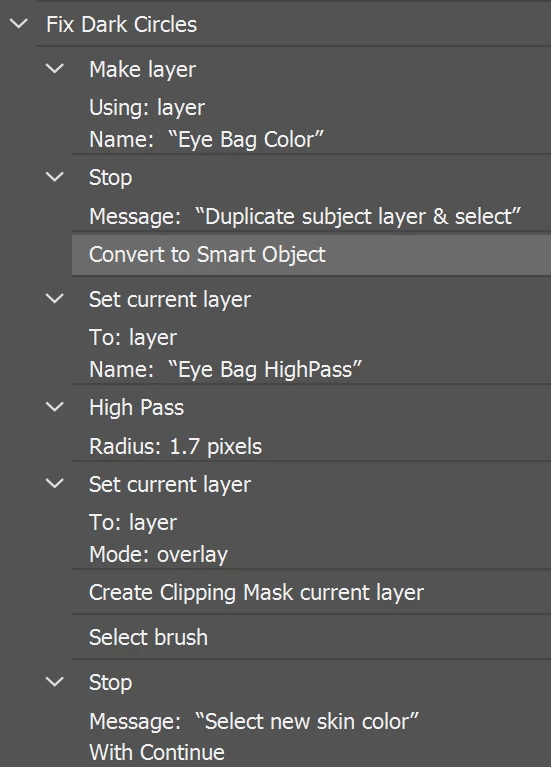
This is the end goal
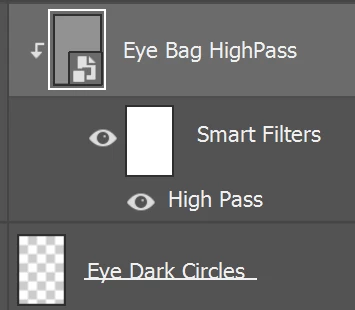
When I open an image in Photoshop, I always duplicate the Background layer. I can't figure out how to tell Adobe to copy the the original duplicated layer then turn the newly copied layer into a Smart Filter.
I tried using the Stop action, but I can't do anything other than close the message.


 AdChoices