Participant
November 12, 2022
Answered

How do I change the alt+drag right click keybind that resizes the brush?

  • November 12, 2022
  • 3 replies
  • 2003 views

I wanted to change it from alt+ drag right click to alt+crtl+leftclick, The same as clip studio paint as I'm much more used to that program. Yet for the life of me, I can't find [cursing removed] bind in the keybind shortcuts window. I'd appreciate it if this gets answered since my workflow is now a lot slower due to this.

Correct answer Trevor.Dennis

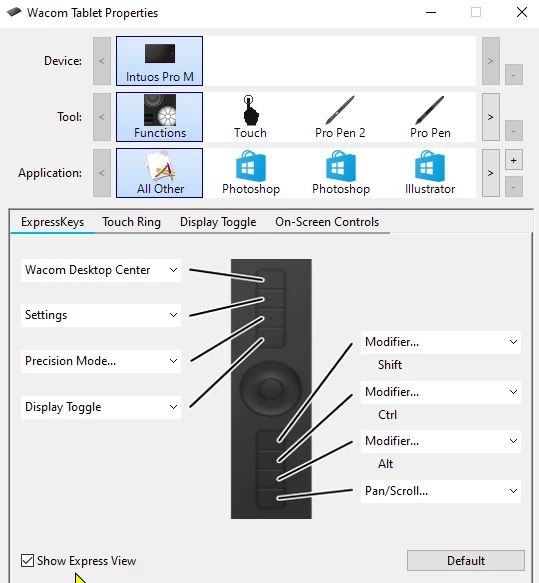
You could use a mouse with programable buttons, or use a tablet.  All of the Wacom Intuos (or whatever they are calling them this week) buttons can be changed.

3 replies

Participant
March 7, 2025

Use keyboard mapping software to set Left Win as Left Alt + Mouse Right Button (recommended: QKeyMapper). You can also swap Left Ctrl and Left Alt positions with it, making Ctrl+H operations much easier.


Here is the diagram

1.

2.By the way, the language can be set in the lower left corner.

3.Preliminary result is as follows


 4. Add the right mouse button


5. The final result is as follows. Don't forget to save your settings.


After clicking "MappingStart ," you can hold the Win key and slide to adjust brush size in Photoshop. The method for swapping Ctrl and Alt follows a similar way, so I won’t elaborate further here. The only drawback is that you have to open this software every time when using the PS, but I don’t think thats a big problem.


download link:https://github.com/Zalafina/QKeyMapper/releases 

Hope this helps!


Trevor.Dennis
Community Expert
Trevor.DennisCommunity ExpertCorrect answer
Community Expert
November 13, 2022

You could use a mouse with programable buttons, or use a tablet.  All of the Wacom Intuos (or whatever they are calling them this week) buttons can be changed.

Known Participant
February 15, 2023

I tried the combination ALT + button on the pen, and I find very unconfortable for professional and extended time of work.
I also use a thicker grip for the pen as I spend 10+ hours per day using the and the original grip is too small for my hands and give me RSI.
On Mac is super easy and comfortable, as your left hand usually rest on the keyboard, I just need to press two keys and holding and dragging the pen on the tablet.
Why on Windows Adobe can't change these hardcoded keys combination is beyond me.
It's the same thing as on Bridge: same suite, export JPEGs file as JPEG extension, compared to PS that exports as JPG, so I usually end with duplicates.
Even this one is hardcoded and cannot be changed.
Plus zillions of other issues. I'm so tired of using Adobe software.

PECourtejoie
Community Expert
Community Expert
February 15, 2023

Hi, I'd feature request/bug report those issues. For Ps it is in here, and for the moment, Bridge uses an uservoice forum: https://adobebridge.uservoice.com/

Jeff Arola
Community Expert
Community Expert
November 12, 2022

As far as i know, that's one of the photoshop keyboard shortcuts that can't be changed in the Keyboard Shortcuts dialog.


Maybe a software like AutoHotkey can do that.