Muhammad Sattar
Known Participant
Jun 13, 2025 7:44 PM UTC
Answered

How Do I Create a Black and Gray Fade Effect Behind a Person on a Business Card?

can someone help me how do i create the back and grey fades effect with a person on business card? thanks 

Trevor.Dennis
Trevor.DennisCorrect answer
Community Expert
Jun 14, 2025 2:17 AM UTC

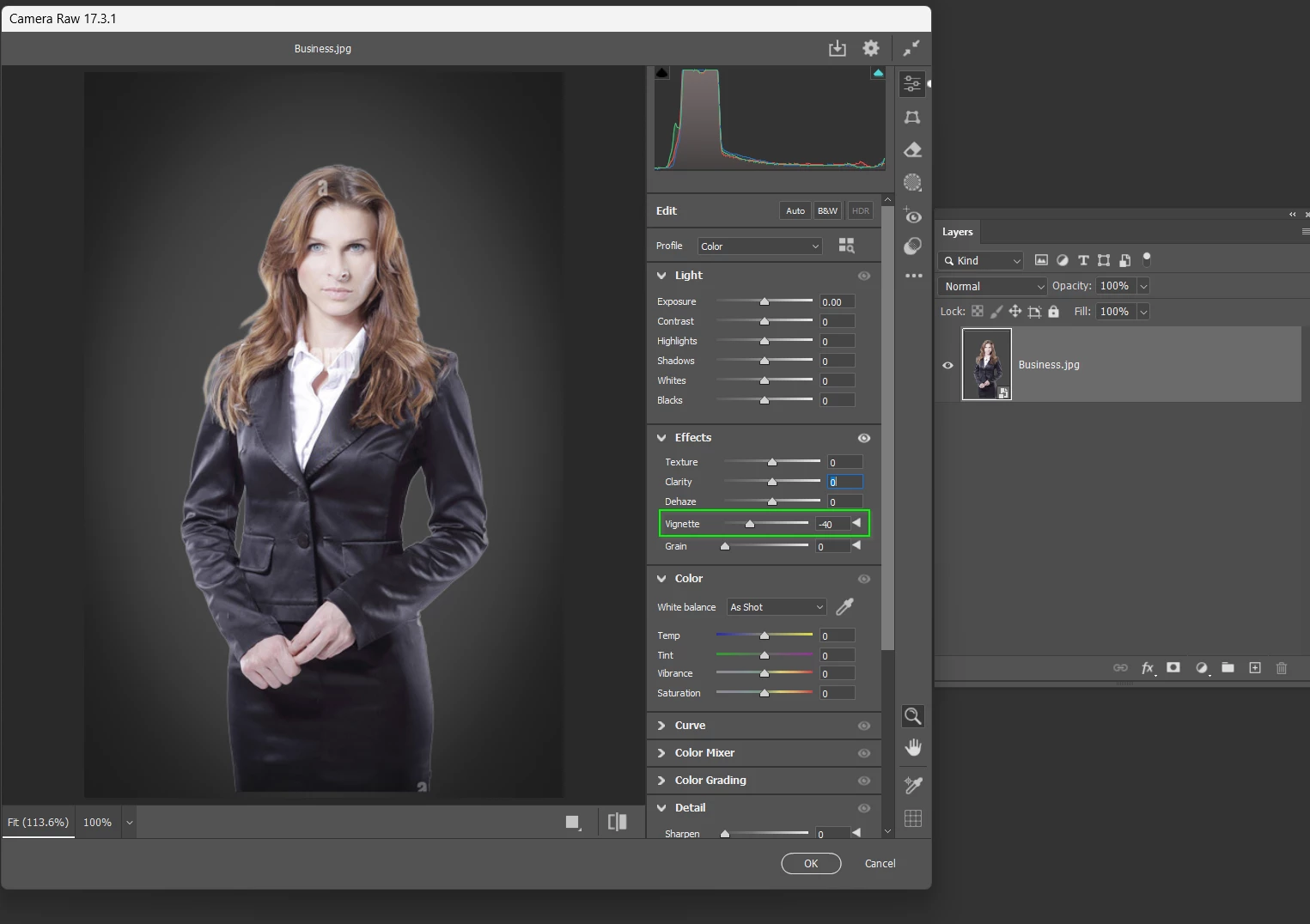
There's a Vignette effect in Camera RAW 

Perhaps the easiest way to use it would be to combine the layers into a single Smart Object layer, and apply the Camera RAW filter to that.

6 replies

MassC
Legend
Jun 25, 2025 7:11 PM UTC

Hey @Muhammad Sattar, I wanted to check in and see if the suggestions were helpful or if you needed additional assistance. If any specific post was particularly helpful, please be sure to mark it as correct. Thank you! ^CM

Translate
c.pfaffenbichler
Community Expert
Community Expert
Jun 15, 2025 11:31 AM UTC

To illustrate what has already been mentioned: 

Translate
Trevor.Dennis
Community Expert
Trevor.DennisCommunity ExpertCorrect answer
Community Expert
Jun 14, 2025 2:17 AM UTC

There's a Vignette effect in Camera RAW 

Perhaps the easiest way to use it would be to combine the layers into a single Smart Object layer, and apply the Camera RAW filter to that.

Translate
Muhammad Sattar
Known Participant
Jun 14, 2025 1:03 AM UTC

thanks for your response. could u eleborate it more

Translate
Stephen Marsh
Community Expert
Community Expert
Jun 14, 2025 9:38 AM UTC
quote

thanks for your response. could u eleborate it more


By @Muhammad Sattar


Presuming that you have the person on a separate layer with a transparent background, the layer underneath could be  radial gradient fill layer, or it could be a solid black layer with a gradient tool applied, or a smart object layer etc. There are many possibilities, it all depends on what you have and what it takes to get the effect you're looking for.

Translate
Stephen Marsh
Community Expert
Community Expert
Jun 13, 2025 9:07 PM UTC

Offhand I'd start with a RGB file using a black to grey radial gradient. This layer may be larger than the canvas and masked and distorted, possibly as a smart object.


Translate