

oprie_ma
Inspiring
April 24, 2025
Answered

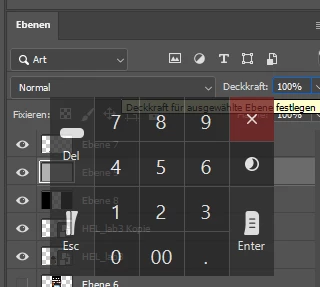
How do I deactivate this virtual number pad?
  • April 24, 2025
  • 3 replies
  • 529 views

How do I deactivate this virtual number pad? 


I'm using Windows 11 and not even the chat GPT tips help.
Thanks

Correct answer oprie_ma

Okay, I asked Wacom what to do, and they told me I needed to disable Windows Ink. And this little square was hiding in the Wacom tablet properties, then under "Tools," and then under "Calibration." My Cintiq was calibrated, so I didn't look there. I unchecked the boxes (on both pens!), rebooted, and finally, the number pad is gone! Thanks, Wacom!


3 replies

oprie_ma
oprie_maAuthorCorrect answer
Inspiring
April 28, 2025

Okay, I asked Wacom what to do, and they told me I needed to disable Windows Ink. And this little square was hiding in the Wacom tablet properties, then under "Tools," and then under "Calibration." My Cintiq was calibrated, so I didn't look there. I unchecked the boxes (on both pens!), rebooted, and finally, the number pad is gone! Thanks, Wacom!


oprie_ma
oprie_maAuthor
Inspiring
April 26, 2025

It's a Photoshop issue. In After Effects or Premiere, I don't get this numeric keypad when I click on a number. But I can't find anything in the preferences to turn it off. 

Anshul_Saini
Community Manager
Community Manager
April 28, 2025

Thanks for your reply! Since this seems to be happening in Photoshop only, I recommend running the app in Safe Mode to rule out any potential conflicts with other software.


Here’s how you can do it:

  • Boot into Safe Mode in Windows 11 by following the steps in this guide: How to Boot Safe Mode in Windows 11.

  • Once in Safe Mode, try using Photoshop without the Wacom tablet connected.

  • If the virtual number pad doesn’t appear, the issue may be related to either the Wacom tablet or Photoshop.

If it doesn’t appear in Safe Mode, connect the Wacom tablet again and see if the issue comes back. If it does, I suggest reaching out to Wacom support for further assistance. If it doesn’t, it might be worth contacting Microsoft support to explore possible solutions related to Windows 11.


Let me know how it goes!

Best,

Anshul Saini

Anshul_Saini
Community Manager
Community Manager
April 24, 2025

Hi @oprie_ma, thanks for sharing the screenshot!


Can you please check the following:

  • Have you restarted your system to see if the virtual number pad disappears?

  • Open Task Manager (Ctrl + Shift + Esc) and look for any apps related to on-screen keyboard, accessibility tools, or touchpad utilities that might be triggering the number pad. Try ending the task to see if it helps.

Let us know what your findings are!


Best,

Anshul Saini

oprie_ma
oprie_maAuthor
Inspiring
April 24, 2025

Thank you. First question: Yes. And second: I haven't found any suspicious tasks. However, I remember having the same problem last time (five years ago). I don't know if it's Windows, Photoshop, or the Wacom tablet. I'd say it looks like a Windows issue.

Also, I've tried so many things, and now right-clicking the pen to open the context menu in Photoshop doesn't work anymore. Two hours ago, I thought it would take a five-minute search.