Hey, I think I found the mystery profiles. First, I realized that I have also seen those Arri etc. profiles in Photoshop, and that they do not appear in ColorSync Utility. Going by what I know from the next subject (after the dashed line below), and because they do not show up in ColorSync Utility, I theorized that the profiles could be in a central location for Adobe only, which would be under /Library (root, not user). I dug around in
/Library/Application Support/Adobe/
and found the profiles here:
/Library/Application Support/Adobe/Color/MPProfiles
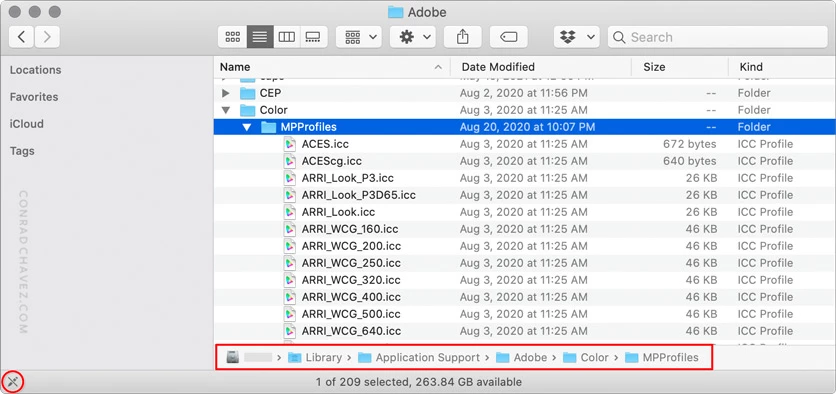
That folder has restricted permissions because it is within a system location, not within a user account, but you could try changing or overriding permissions if you wanted to try to rip out those profiles.
- - - - - - - - - - - -
Regarding how to organize profiles in the Print dialog: The following is my sense of it, it might need to be confirmed by someone like @TheDigitalDog…but the reason the Epson profiles appear on a line above the rest in the Print dialog box is because Photoshop detects that they are part of a printer driver installation on that computer. Because the profile menu can include both manufacturer’s profiles and user-added profiles that are all for the same Epson printer model, but only the manufacturer’s profiles appear above the line. From testing, I believe that the profiles that appear above the line are not in any of the usual ColorSync folder locations, but deep in an installed printer driver package. For example, the following profile appears above the line in my copy of Photoshop:
/Library/Printers/EPSON/InkjetPrinter2/ICCProfiles/Pro3880.profiles/Contents/Resources/Epson Stylus Pro 3880_3885_3890 ArchivalMattePaper.icc
That’s inside a macOS printer driver package, not a regular folder.
I have not tried shoe-horning user-supplied profiles into such a package to see if that would put them above the line. It may not work if macOS security restrictions prevent hacking packages in /Library, which is root level, not user level. But it is something you could look into.
Deleting the profiles from /Library/Application Support/Adobe/Color/MPProfiles got rid of almost all the extra profiles! I always save removed profiles in a backup folder, in case there is trouble of some sort later... but everything works fine right now. Thanks again for the suggestion!



 AdChoices