
Answered
How do I free transform a SMART OBJECT and still allow for INTERPOLATION options?
When I resize a non-smart object layer:

When I resize a smart object:

How do I enable this? Or remove the anti aliasing?

When I resize a non-smart object layer:
When I resize a smart object:
How do I enable this? Or remove the anti aliasing?
As long as the file remains a smart object, it obviously doesn’t apply, since the original image hasn’t been transformed yet. It’s just the screen representation.
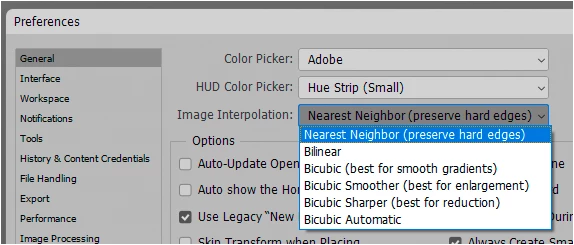
When you rasterize the smart object, the actual transform happens. At that point the setting in Preferences > General applies:
Already have an account? Login
Enter your E-mail address. We'll send you an e-mail with instructions to reset your password.


 AdChoices