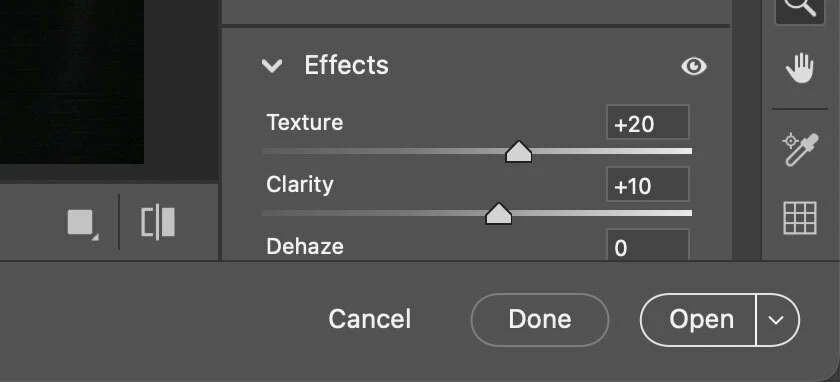
It depends on how you opened Camera Raw. There are two ways to do that, and one way does not show the Open button.
The Open (in Photoshop) button is always there if you opened an image file directly into Camera Raw, such as:
From Adobe Photoshop, choosing the command File > Open.
From Adobe Bridge, choosing the command File > Open in Camera Raw.
The reason the Open button is available is that the file is not yet open as a Photoshop document.
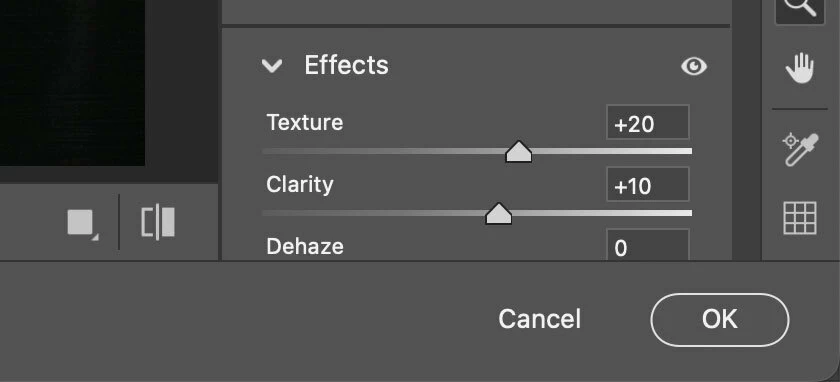
The Open button does not appear if the image file is already a layer in Photoshop, such as when:
You select a layer and choose the command Filter > Camera Raw Filter.
You select a raw Smart Object and choose Layer > Smart Objects > Edit Contents (or double-click it).
The reason the Open button is missing for a layer is simple: The image is already part of a Photoshop document…it’s open, so it does not need to be opened again! So an Open button would not make sense there, instead you get an OK button that returns you to the containing Photoshop document that’s already open.
The most common reason the Open button is missing is that Camera Raw was applied as a filter in an already open Photoshop document (using the command Filter > Camera Raw Filter), instead of opening a raw file. The Camera Raw Filter is not the full version of Camera Raw because it edits the selection as a layer, not as a true raw file, so file-level Camera Raw features cannot be available in the filter version of Camera Raw.
It depends on how you opened Camera Raw. There are two ways to do that, and one way does not show the Open button.
The Open (in Photoshop) button is always there if you opened an image file directly into Camera Raw, such as:
From Adobe Photoshop, choosing the command File > Open.
From Adobe Bridge, choosing the command File > Open in Camera Raw.
The reason the Open button is available is that the file is not yet open as a Photoshop document.
The Open button does not appear if the image file is already a layer in Photoshop, such as when:
You select a layer and choose the command Filter > Camera Raw Filter.
You select a raw Smart Object and choose Layer > Smart Objects > Edit Contents (or double-click it).
The reason the Open button is missing for a layer is simple: The image is already part of a Photoshop document…it’s open, so it does not need to be opened again! So an Open button would not make sense there, instead you get an OK button that returns you to the containing Photoshop document that’s already open.
The most common reason the Open button is missing is that Camera Raw was applied as a filter in an already open Photoshop document (using the command Filter > Camera Raw Filter), instead of opening a raw file. The Camera Raw Filter is not the full version of Camera Raw because it edits the selection as a layer, not as a true raw file, so file-level Camera Raw features cannot be available in the filter version of Camera Raw.
Thanks for reaching out. I still see the option to open at my end. Could you please share a small screenshot of what you're seeing? That will help me better understand the issue and assist you more effectively.
Translate
Thanks, Srishti Bali | Community & Engagement Strategist, Digital Imaging | Adobe





 AdChoices