Chris  P.  Bacon
Inspiring
Jan 13, 2023 12:33 PM UTC
Answered

How do I prevent the Freeform Pen Tool from making adjustments to the path I drew?

When I release the mouse button, it will adjust the path I drew and it's not smoothening it, it's rather straightening it, and I don't want that because I am using it for accurate free hand selections. 

Mohammad.Harb
Mohammad.HarbCorrect answer
Community Expert
Jan 13, 2023 4:05 PM UTC

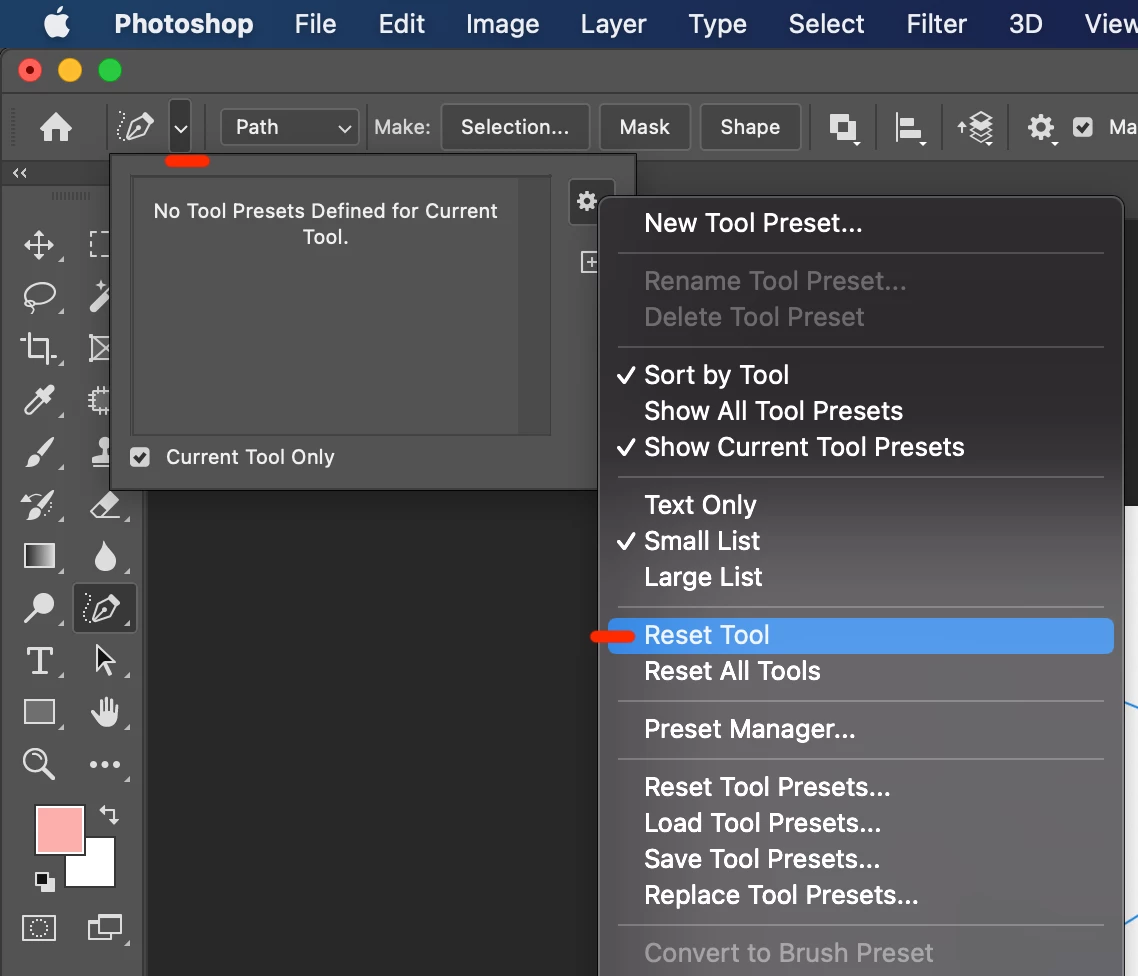
Does resetting te Tool as shown in the screenshot fix the problem ? 

4 replies

Mohammad.Harb
Community Expert
Mohammad.HarbCommunity ExpertCorrect answer
Community Expert
Jan 13, 2023 4:05 PM UTC

Does resetting te Tool as shown in the screenshot fix the problem ? 

Translate
Inspiring
May 16, 2025 5:19 AM UTC

Just to finish off this conversation, resetting the tool did it for me when I had this same problem. Works a treat now.

Translate
c.pfaffenbichler
Community Expert
Community Expert
Jan 13, 2023 1:10 PM UTC

What is the »Curve Fit«-setting? 

Translate
Chris  P.  Bacon
Inspiring
Jan 13, 2023 3:58 PM UTC

It was 2 px, I have tried both 10 and 0.5, and I have seen no difference.

Best would be if the path would look exactly as I drew it.

I know it has to insert anchor points, but it still should be possible, isn't it?

Translate