

TomHu
Inspiring
March 27, 2019
Question

How do I remove CS6 from updating in ACC?

  • March 27, 2019
  • 1 reply
  • 864 views

Hi, I previously had CS6 Photoshop installed before upgrading to the creative cloud version. Now every time an update is tried, I get errors about a problem updating CS6.

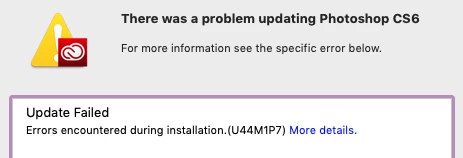
I have no desire to update or use CS6 within CC, and I'm just not interesting in doing all the steps of uninstalling CS6 and reinstalling it to fix this bug, I just want CC to stop trying to update CS6. Surely there must be a way to do this, but so far I've been unable to find an answer for this.

Can someone please tell me how to turn off updating for just CS6 and remove it from CC?

    This topic has been closed for replies.

    1 reply

    Sahil.Chawla
    Adobe Employee
    Adobe Employee
    March 27, 2019

    Hi there,

    Please have a look here and let us know if it helps:

    "Installation failed" error U44M1P7 with Adobe Creative Cloud or Adobe Creative Suite 6 updates

    Regards,
    Sahil

    TomHu
    TomHuAuthor
    Inspiring
    March 27, 2019

    Hi,

    No, that doesn't help because those instructions want me to uninstall then reinstall CS6 somehow just to make this error go away.

    I want to know how to TURN OFF updating for CS6 within the Adobe CC app, I don't want to use CS6, I don't want to uninstall then reinstall, and I don't want it updating at all on my computer.

    I want to know how to REMOVE this app from my installation so it doesn't keep trying to update and fail every time? I don't understand why Adobe is forcing me to have this legacy app.

    Per Berntsen
    Community Expert
    Community Expert
    March 27, 2019

    Since CS6 is listed in the desktop app, it seems to be installed, or the desktop app thinks it is installed. Maybe it was not uninstalled properly. if you click here, is Uninstall listed as an option?