

Participant
August 7, 2025
Answered

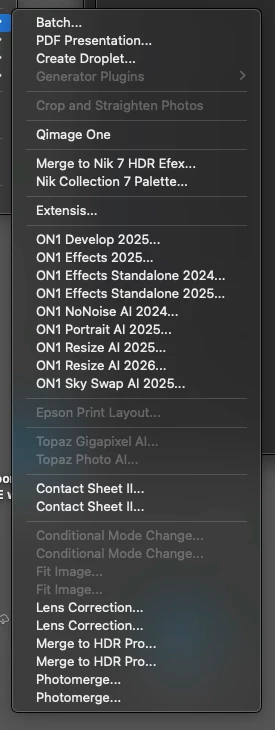
How do I remove duplicate Automate items?

  • August 7, 2025
  • 2 replies
  • 256 views

Where are these located so I can delete the duplicates? Mac OS 15.5 Photoshop 2025

Correct answer laughingcamera

I think I found the issue, one copy was in 

and one copy was in 


I deleted the copy in 

and all good now.

2 replies

Jeff Arola
Community Expert
Community Expert
August 7, 2025

Two places to look for the plugins from ON1

Applications/Adobe Photoshop 2025/Plug-ins

and

Macintosh HD/Library/Application Support/Adobe/Plug-Ins/CC


For the duplicated scripts such as Contact Sheet II and below look in

Applications/Adobe Photoshop 2025/Presets/Scripts


Do you have an external drive for Time Machine backups connected to your Mac?

Participant
August 7, 2025

Yes to the Time Machine question. I looked it all those places and only see one instance of each. See the paths at bottom of screen captures.

laughingcameraAuthorCorrect answer
Participant
August 7, 2025

I think I found the issue, one copy was in 

and one copy was in 


I deleted the copy in 

and all good now.

Bojan Živković11378569
Community Expert
Community Expert
August 7, 2025

I’m using Windows, and scripts are typically located in the Presets/Scripts folder.

Participant
August 7, 2025

Not in there on the Mac. I looked everywhere for them, application support, etc.


