


ChileJam
Participant
April 17, 2018
Question

How do I remove reflected objects from metal surfaces and replace with other reflections?

  • April 17, 2018
  • 1 reply
  • 3424 views

I want to take this picture of an Airstream (that was photographed in a parking lot) and place it in a forest.  So I have two (2) problems:

1.  How can I remove the original reflections and...

2.  How can I make realistic reflections of trees and other things that might be in the forest (trees, grass, streams, etc)
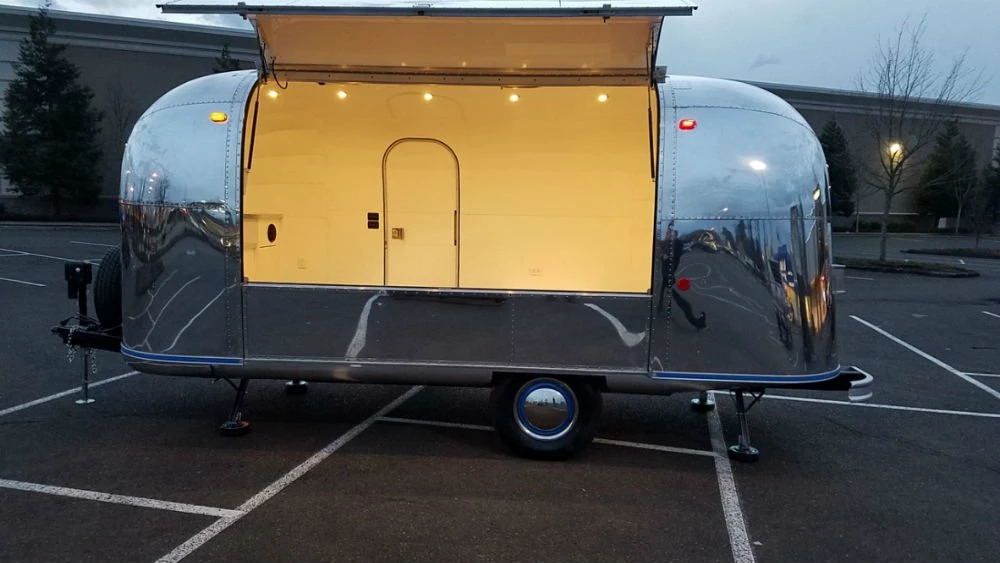
I have a lot of shiny objects that I'll be shooting (and CAN'T move), so this is a technique, or several techniques, that I need to learn.

Thanks for any help!

1 reply

Nancy OShea
Community Expert
Community Expert
April 17, 2018

Do a Google search for vehicle wrap in Photoshop.  That should get you started.

Nancy O'Shea— Product User & Community Expert
ChileJam
ChileJamAuthor
Participant
April 17, 2018

Thanks, Nancy,

I watched a couple of YouTube tutorials on wraps for cars, but I'm not really seeing how designing a wrap and placing it on a car, van (or Airstream in my case), helps me remove reflections.

Any hints for what else I might do (or how I should change what I'm looking at) in order to accomplish my end goal?

Thanks again!

Michael

Norman Sanders
Legend
April 18, 2018

Although changing the camera elevation when you do the original photography may alter the amount of current reflection on the Arirstream, it is possible that the repacment reflection over the current one will make removing the current one unnecessary.  View the area several times throughout the day and determine which provides optimum time to do the photography.  (The tilted horizon line suggests this shot was handheld. I urge you to use a tripod.)

For this type of image, one thing you should learn is proficiency with the Pen tool. It will be needed in order to create a precise silhouette of the Airstream. (From its Path you will make a Selection and then a Mask.) Also, learn to use Curves, Levels or the Screen command to lighten a duplicate layer of the current image. It will make the silhouetting a bit easier to see. Once the Mask is made you can delete the lightened layer.

The reflection to appear on the side of the Airstream will be a vertically flipped version of a section of the forest image you choose. Consider a slight blur, as well. Google images with a similar effect as a guide. Do not Warp the reflection. It will make the side of the Airstream a tad dented.

In all, you will have at least three layers: the forest layer, the Airstream layer and the reflection layer.

Good luck.