



Graphic Squirrel
Inspiring
September 24, 2025
Question

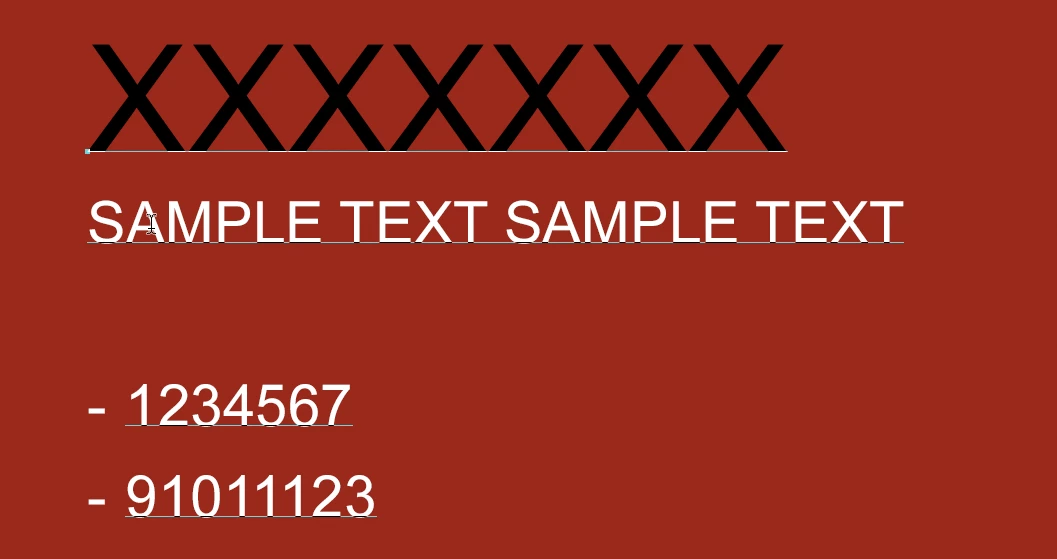
How do I remove the lines under the words in the text box in Photoshop?

  • September 24, 2025
  • 1 reply
  • 162 views

I recently noticed these lines appearing under my text when typing in a text box in photoshop.  I find them incredibly annoying and want to know how to permanently get rid of them.  Someone in another forum suggested using Ctrl + H, which only works for a second and then the lines return.  


Using Windows PC, Photoshop 25.12.3.


Thank you!

GS


1 reply

CMass
Community Manager
Community Manager
September 24, 2025

Hey @Graphic Squirrel

I'm not sure if this is something you can hide. In that screenshot is the text tool active? ^CM

Graphic Squirrel
Inspiring
October 2, 2025

Thanks for your reply!  In the screenshot, I have the Text tool selected and have clicked in the text box.  The text is not selected - those lines just appear when I click in the box.  In the Type dropdown, the Convert to Paragraph Text is grayed out.  Oddly enough, another file (created using this one as a template) has a text box without the underlines and in the Type dropdown, the Convert to Point Text is grayed out.  


GS

Sameer K
Community Manager
Community Manager
October 16, 2025

Thanks for the details. These are baselines as discussed here: https://adobe.ly/4oqGV8X


Thanks!
Sameer K
(Type '@' and type my name to mention me when you reply)