

Fallen_Nyx
Known Participant
February 28, 2022
Answered

How do I start Adobe Bridge in Photoshop?

  • February 28, 2022
  • 10 replies
  • 7613 views

I'm doing my tutorials in the photoshop textbook (2021), in the lession it says to start photoshop, choose File>Browse in Bridge. That option doesn't appear in my File tab. Do you know how to fix this?
This topic has been closed for replies.
Correct answer Jeff Arola

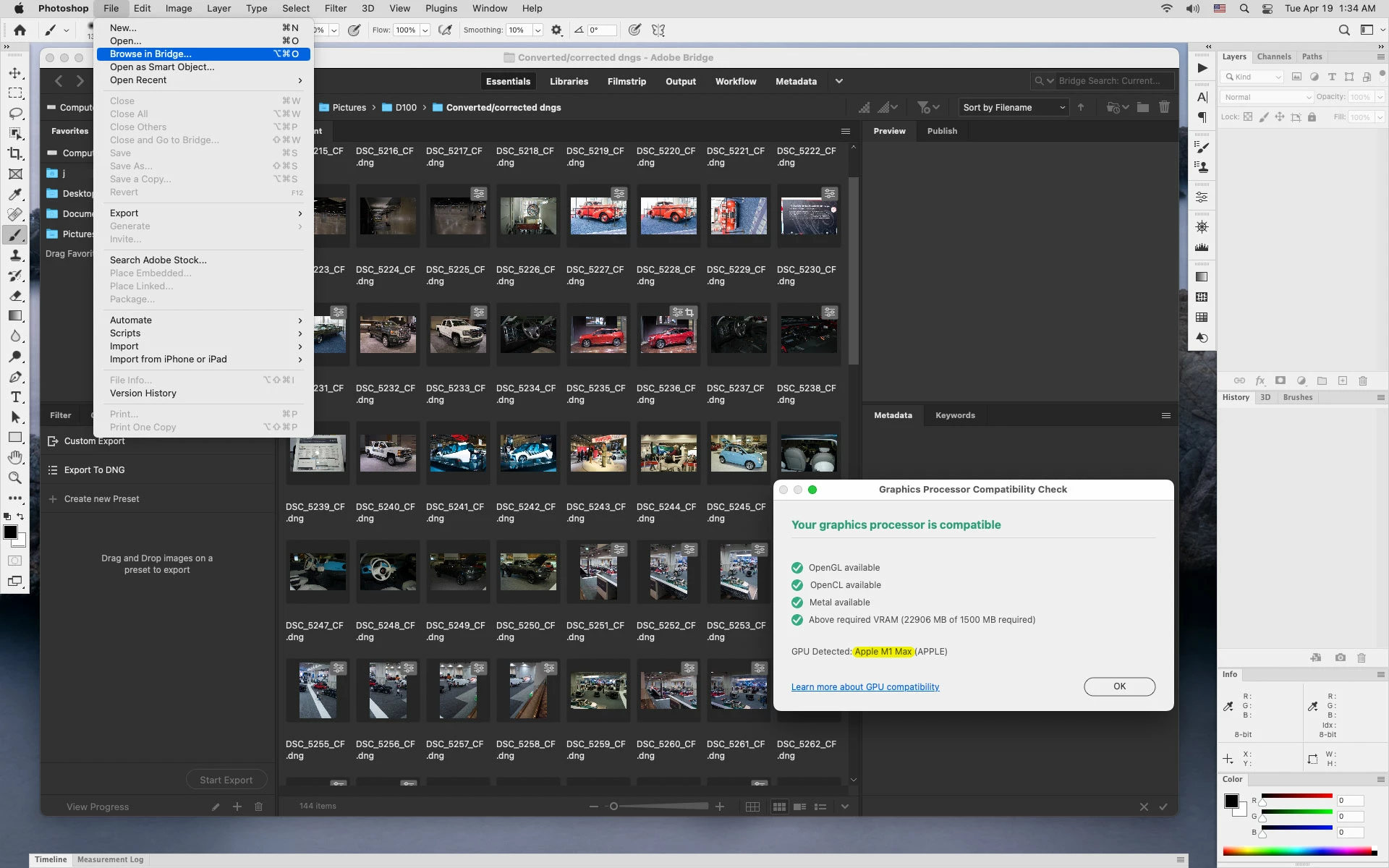
As of the photoshop 2022 (23.3 update) File>Browse in Bridge is present on M1 Processor Macs


10 replies

Jeff Arola
Community Expert
Jeff ArolaCommunity ExpertCorrect answer
Community Expert
April 19, 2022

As of the photoshop 2022 (23.3 update) File>Browse in Bridge is present on M1 Processor Macs


Stephen Marsh
Community Expert
Community Expert
April 19, 2022

Thanks for the update Jeff!


I still prefer the script, as my expectation is that the Browse in Bridge command would take one to the folder/file open in Photoshop, which it doesn't do, all it does is opens Bridge.

Stephen Marsh
Community Expert
Community Expert
March 21, 2022

Here is a v2 of the previous script, special thanks to @Kukurykus for helping to extend the original code.


/*
https://community.adobe.com/t5/photoshop-ecosystem-discussions/how-do-i-start-adobe-bridge-in-photoshop/m-p/12818569
Stephen Marsh, v2.0 - 21st March 2022
*/

/*
// Add a new item in the File > Automate menu to separate the script from the normal scripts folder
<javascriptresource>
<name>$$$/JavaScripts/BrowseInBridge/Menu=Browse in Bridge...</name>
<category>BrowseInBridge</category>
<menu>automate</menu>
</javascriptresource>
*/

#target photoshop

// Saved doc
try {
    app.activeDocument.path;
    var bt = new BridgeTalk();
    // Call Bridge
    bt.target = 'bridge'; // Version agnostic
    //bt.target = 'bridge-11', // Bridge 2021
    //bt.target = 'bridge-12', // Bridge 2022
    // Make Bridge the active app
    BridgeTalk.bringToFront('bridge');
    // Display the Photoshop doc's parent folder in Bridge
    //bt.body = 'app.document.thumbnail = ' + activeDocument.path.toSource(); // Folder
    bt.body = 'app.document.thumbnail = ' + activeDocument.fullName.toSource(); // Select File
    bt.send();

// Unsaved doc
} catch (err) {
    BridgeTalk.launch('bridge');
    BridgeTalk.bringToFront('bridge');
}
jane-e
Community Expert
Community Expert
March 20, 2022

@Fallen_Nyx 


Did you try what Melissa said? Just open the Bridge application? Once there, browse to your class files, then open the image.

  • Open the Creative Cloud app, then launch Bridge
  • Open the Applications folder and launch Bridge
  • Use Spotlight and type "Bridge"
  • Put an alias for Bridge in your Dock or Sidebar or Desktop and launch it from there.

Jane


Jeff Arola
Community Expert
Community Expert
March 1, 2022

If your mac has an M1 Processor, then that's the reason you don't see File>Browse in Bridge in photoshop.


https://helpx.adobe.com/photoshop/kb/photoshop-for-apple-silicon.html

Fallen_Nyx
Known Participant
March 17, 2022

I do have the M1 Processor, how can I get around this?

Stephen Marsh
Community Expert
Community Expert
March 17, 2022

I just made my previous reply bold+red...


It would take more work to push the current document path to Bridge to fully emulate the missing command.

Stephen Marsh
Community Expert
Community Expert
March 1, 2022

As a last resort, a custom Photoshop script can be used to launch Bridge.

Fallen_Nyx
Known Participant
March 17, 2022

how?

Stephen Marsh
Community Expert
Community Expert
March 17, 2022

@Fallen_Nyx wrote:

how?


Photoshop JS code:


/*
https://community.adobe.com/t5/photoshop-ecosystem-discussions/how-do-i-start-adobe-bridge-in-photoshop/m-p/12818569
Stephen Marsh, 1st March 2022
*/

// Add a new item in the File > Automate menu to separate the script from the normal scripts folder
/*
<javascriptresource>
<name>$$$/JavaScripts/LaunchAdobeBridge/Menu=Launch Adobe Bridge...</name>
<menu>automate</menu>
</javascriptresource>
*/

#target photoshop

var bt = new BridgeTalk();
// BridgeTalk code to launch Bridge if it is not running
if (!BridgeTalk.isRunning('bridge')) {
    BridgeTalk.launch('bridge'); // Version agnostic
    //BridgeTalk.launch('bridge-12'); // Bridge 2022
}


  1. Copy the code text to the clipboard
  2. Open a new blank file in a plain-text editor (not word-processor)
  3. Paste the code in
  4. Save the text file as .txt
  5. Rename the file extension from .txt to .jsx
  6. Install the .jsx file to run
Bojan Živković11378569
Community Expert
Community Expert
March 1, 2022

Als o check that visibility of menu item is set to visible.

Fallen_Nyx
Known Participant
March 17, 2022

I don't have browse in bridge

jane-e
Community Expert
Community Expert
February 28, 2022

@Fallen_Nyx 


  • Have you installed Adobe Bridge from the Creative Cloud app? It's a separate application and has to be installed.

  • You are on Page 36, Step 3. When you did Step 1, did you get a dialog to Reset Preferences? If not, open PS and go to Photoshop menu > Preferences > General > Reset Preferences on Quit. The timing with holding down the keys as you launch can be tricky.


Please report back to let us know you have Adobe Bridge open with one of these methods.


Jane


Fallen_Nyx
Known Participant
March 17, 2022

I installed the adobe bridge separatly onto my laptop and have reset my preferences several times already to work on my other tutorials

melissapiccone
Community Expert
Community Expert
February 28, 2022

I teach out of that book and I have never accessed Bridge that way. Just open it - it's a seperate application. I highly recommend always using Bridge. I usually start there and open my documents from Bridge. 

Melissa Piccone | Adobe Trainer | Online Courses Author | Fine Artist
D Fosse
Community Expert
Community Expert
February 28, 2022

Yes, absolutely, me too. I can't really see the purpose of that menu item.


But if the scripts aren't running, that might cause other problems.

D Fosse
Community Expert
Community Expert
February 28, 2022

Do you have these scripts enabled?

Fallen_Nyx
Known Participant
March 17, 2022

I don't even see startup scripts as an option😖

Fallen_Nyx
Known Participant
February 28, 2022
Screen_Shot_2022-02-28_at_2-52-05_PM.png