Participant
September 7, 2025
Answered

how do you turn off camera raw?

  • September 7, 2025
  • 2 replies
  • 161 views
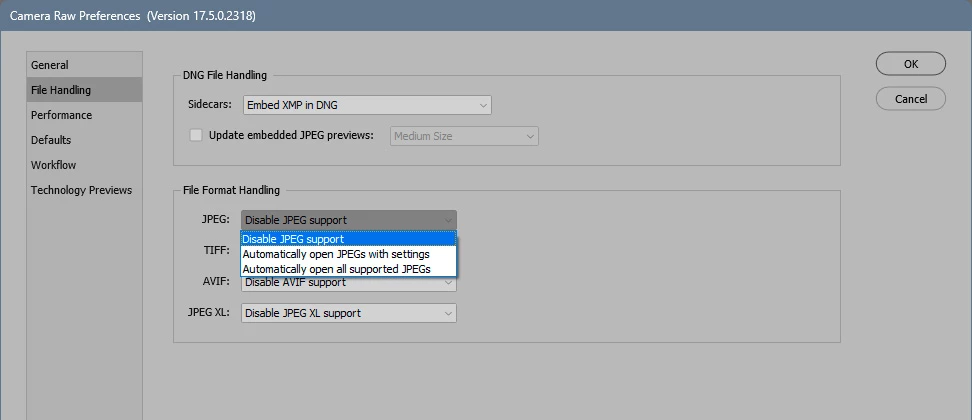
I allowed myself to click on the camera raw icon when invited by Adobe - and now can't get past it every time I try to open a jpeg in photoshop. How do I get back to "simple" desktop photshop?

Correct answer D Fosse

2 replies

D Fosse
Community Expert
D FosseCommunity ExpertCorrect answer
Community Expert
September 7, 2025

AxelMatt
Community Expert
Community Expert
September 7, 2025
quote
I allowed myself to click on the camera raw icon when invited by Adobe - ...
By @patrick_5677


Where do you click on the Camera Raw icon? Whre are you invited by Adobe? Please describe a little more detailed.

Normally there's no such icon on the Windows Desktop or the Windows start menu. Camera Raw start only if you try to open a RAW file.


What you can try is to reset the preferences of Photoshop using the steps described here:

https://helpx.adobe.com/photoshop/using/preferences.html#reset-preferences

It's recommended to backup your settings before resetting the preferences.

See here:  https://helpx.adobe.com/photoshop/using/preferences.html#backup-photoshop-preferences


My System: Intel i7-8700K - 64GB RAM - NVidia Geforce RTX 3060 - Windows 11 Pro 25H2 -- LR-Classic 15 - Photoshop 27 - Nik Collection 8 - PureRAW 6 - Topaz Photo AI