Inspiring
Nov 13, 2024 7:20 PM UTC
Answered

How get rid of ANNOYING New feature pop ups

Can't believe have to post about this


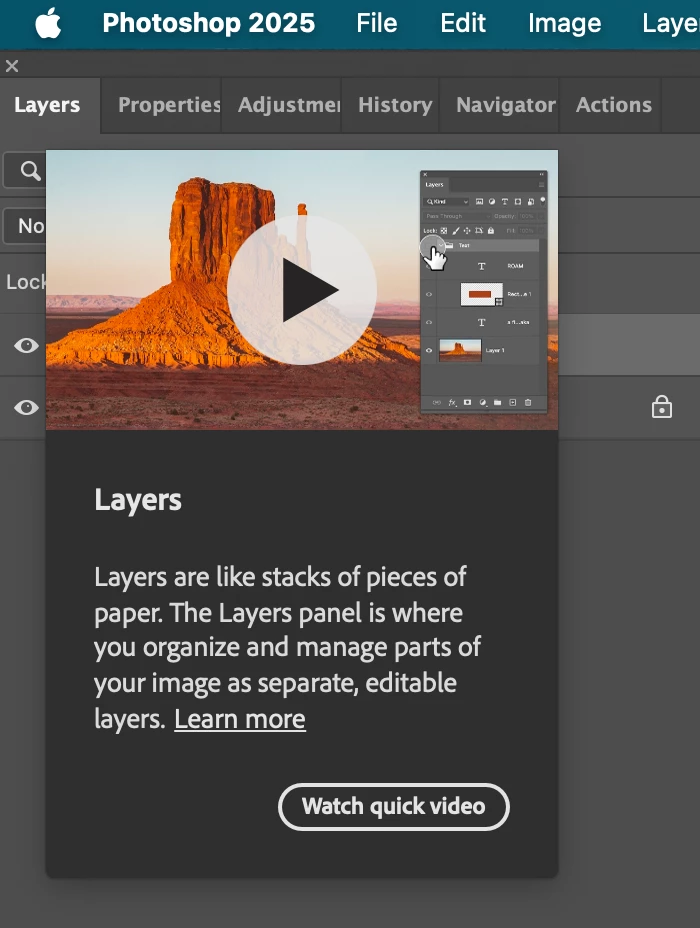
This  ANNOYING thing block layers, so cant see what doing in photoshop.  I played the annoying video, still comes up!


Help! thanks.


Im a 25 year user, what have some department at Adobe, just dedicated to annoying it's users? Thanks!  Too many employees?


J E L
J E LCorrect answer
Community Expert
Nov 13, 2024 7:53 PM UTC

Hi @larry45, totally annoying for many of us, indeed. Have you tried this yet? Under Preferences > Tools, uncheck Show Rich Tooltips.

10 replies

Participating Frequently
Jun 24, 2026 3:26 PM UTC

Please remove or give option to remove to featured bar and AI option interferring with home screen. I use this screen to watch my revisions of photos.  Don’t need damn AI, give us an option to remove the notification that actually works. Nothing is working to get rid of this damn thing. Thinking about using another photo editor and canceling adobe.

Translate
Greyygg
Participant
Jan 10, 2025 8:33 PM UTC

I think they should just add a collapsable panel as a place to access those if you want, just like swatches, layers or anything else. Then you can just detick it under window if you don't want it there. Turning it completely off in preferences is good of course, just get it off the workspace Adobe!!! The AI toolbar too, let me collapse it to the side where I can find it if I want without having to figure it out and turn it back on

Translate
larry45Author
Inspiring
Dec 24, 2024 11:00 PM UTC

Came up again today, really make the software so ANNOYING. think shold a letter to Adobe?  Hardcopy or?  Also new pesty AI little pop ups..

Translate
J E L
Community Expert
J E LCommunity ExpertCorrect answer
Community Expert
Nov 13, 2024 7:53 PM UTC

Hi @larry45, totally annoying for many of us, indeed. Have you tried this yet? Under Preferences > Tools, uncheck Show Rich Tooltips.

Translate
larry45Author
Inspiring
Nov 13, 2024 7:58 PM UTC

But I look tool tips..    Are there variations of tool tips?   is this all tool tips?  Is this a video tool tips, or promo tool tip that bloks Layers?

Does this solve issue or your just guessing? thanks. JEL

Translate
J E L
Community Expert
Community Expert
Nov 18, 2024 5:35 PM UTC

@larry45, no, I'm not guessing. Turning rich tool tips off did it for me originally (several versions back). With the latest version (26.0.0 Release), it appeared once the first time I launched, I clicked the “x” in the corner (something like that), and it hasn't shown up again after many repeat launches. I think it appears twice for some people and then stops if you have that preference unchecked. Let us know how it goes for you!

Translate