


psummerfield
Known Participant
August 4, 2026
Answered

how get rid of new visual guides

  • August 4, 2026
  • 3 replies
  • 48 views

Heya adobe collective.

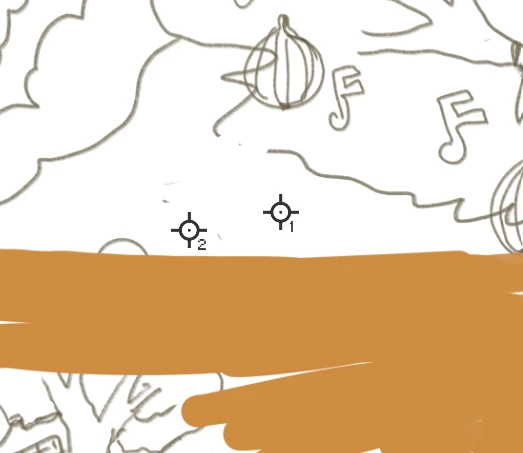
I somehow accidently created these new visual guides and i cant work out to get rid of them except by hiding extras and its not a fix and they keep coming back. I know its something simple and something new.

 

    Correct answer Stephen Marsh

    Those are color samplers (i) found under the eyedropper tool (perhaps added via shift i). They are used to show colour values in the info panel.


    Once the color sampler tool is activated, there's a "clear all" button in  the toolbar to remove all samplers.
     

    Otherwise, you can Ctrl/Cmd drag the samplers off the document towards the rulers/canvas edge to manually clear.

    3 replies

    Conrad_C
    Community Expert
    Community Expert
    August 4, 2026

    Another option: If the Color Sampler tool is selected, if you hold down the Option (macOS) or Alt (Windows) key as you hover the pointer over any color sampler, a scissors icon appears next to the pointer indicating that clicking on that sampler will “cut” (delete) it.

    Stephen Marsh
    Community Expert
    Stephen MarshCommunity ExpertCorrect answer
    Community Expert
    August 4, 2026

    Those are color samplers (i) found under the eyedropper tool (perhaps added via shift i). They are used to show colour values in the info panel.


    Once the color sampler tool is activated, there's a "clear all" button in  the toolbar to remove all samplers.
     

    Otherwise, you can Ctrl/Cmd drag the samplers off the document towards the rulers/canvas edge to manually clear.

    psummerfield
    Known Participant
    August 4, 2026

    life saver :)