

Kapik
Known Participant
Aug 8, 2021 2:47 PM UTC
Question

How to apply a clipping mask to a folder?

Hi guys,
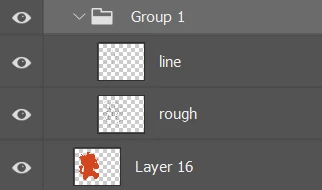
 

How to apply a clipping mask to a folder labeled as Group 1? Apparently I can only do it to a single layer one by one or I have to convert this folder as a smart object in order to a clipping mask. I don't want to merge and convert the layers inside the folder because I need to edit them later on.

This topic is closed to new replies. Start a new post to keep the conversation going.

7 replies

Known Participant
Nov 20, 2024 10:14 AM UTC

Hello,
I sent the same request here!
You can vote positively, in the hope that the developers hear us 😉


https://community.adobe.com/t5/photoshop-ecosystem-ideas/clipping-mask-folder-to-a-layer/idi-p/14991...

Translate
Kukurykus
Legend
Aug 8, 2021 4:06 PM UTC

Add a layer over group and clipping mask?

Translate
Kapik
KapikAuthor
Known Participant
Aug 8, 2021 11:19 PM UTC

It is okay to apply a clipping to a single or multiple layers to a folder. But how to apply a clipping mask to a folder over a layer without having to merge the folder into a single layer?

Translate
Kukurykus
Legend
Aug 8, 2021 11:49 PM UTC

Let's see what experts will say...

Translate
Participating Frequently
Aug 8, 2021 3:15 PM UTC

The same as any layer, highlight the group, Add Layer Mask.

Translate
Kapik
KapikAuthor
Known Participant
Aug 8, 2021 11:14 PM UTC

I want to apply a clipping mask to a folder instead of a layer mask.

I believe these two work differently and I dont have any issue to add a layer mask to a folder.

Translate
Kapik
KapikAuthor
Known Participant
Aug 8, 2021 2:55 PM UTC


If clipping mask to a folder is not possible, then how do I apply clipping mask 'pink' layer only to 'blue' layer? I need to paint the pink color inside the blue color only.

Translate