
Participant
Nov 19, 2026 4:42 AM UTC
Question

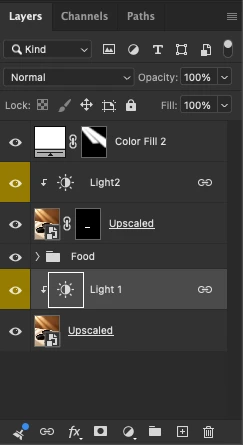
How to apply one adjustment (lights) layer to multiple non-adjacent layers without changing layer order?

I'm trying to adjust my lighting layers in Photoshop using the same adjustment settings (Exposure, Contrast, Highlights, Shadows, Whites, and Blacks).

Currently, I have multiple Light layers, and I want to apply the same adjustment settings to another Light layer without having to manually recreate or copy all the settings each time, as this takes quite a long time.

Is there a way to use one adjustment layer to control multiple separate Light layers while keeping my original layer order unchanged?

I want the adjustments to affect only the specific Light layers, without affecting the other layers in between.

Any suggestions or workflow recommendations would be greatly appreciated. Thank you!
 

    1 reply

    Participant
    Nov 19, 2026 5:41 AM UTC

    Short answer: one adjustment layer can't be clipped to several separated layers at once — a clipping mask only affects the single layer directly below it, and an unclipped adjustment layer affects everything below it. So the cleanest way to do what you want with a single adjustment layer is to group the Light layers together:


    1. Select your Light layers in the Layers panel (Ctrl/Cmd-click each one), then press Ctrl/Cmd+G to put them in a group. Their order relative to each other stays the same.

    2. Drag your adjustment layer to the top of that group, above the highest Light layer.

    3. Change the group's blend mode from Pass Through to Normal. This is the important step — with Pass Through, an adjustment layer inside a group still affects the layers below the group, but with Normal it only affects what's inside the group.


    Now any change you make in that one adjustment layer applies to all the Light layers in the group and nothing else, so you only have to set the Exposure, Contrast, Highlights, Shadows, Whites and Blacks once.


    If grouping really isn't an option, the fallback is to duplicate the adjustment layer for each Light layer and Alt-click the line between each copy and its Light layer to clip it — but then you'd have to update each copy separately whenever you change the settings, which is exactly the tedious part you're trying to avoid.

    Translate