Participant
July 24, 2025
Answered

How to change size of Open file dialog box/screen?

  • July 24, 2025
  • 1 reply
  • 260 views

At some point I accidentally maximized my Open file dialog box, and now I'm unable to make is smaller.  The mouse changes to arrows on the edges, but I cannot adjust the size of the window.


I am using Photoshop CS 6, Version 13. Yes, I know, old, not supported, ect. But it works well for what I use it for.


I found a post about this same issue here: https://community.adobe.com/t5/photoshop-ecosystem-discussions/change-size-of-open-file-dialog-box-screen/td-p/14002705


Trouble is, on my version, there is no UXP in Common Files to rename as the solution suggests.


Does anyone know of a way to fix this issue?

 

Correct answer Ged_Traynor

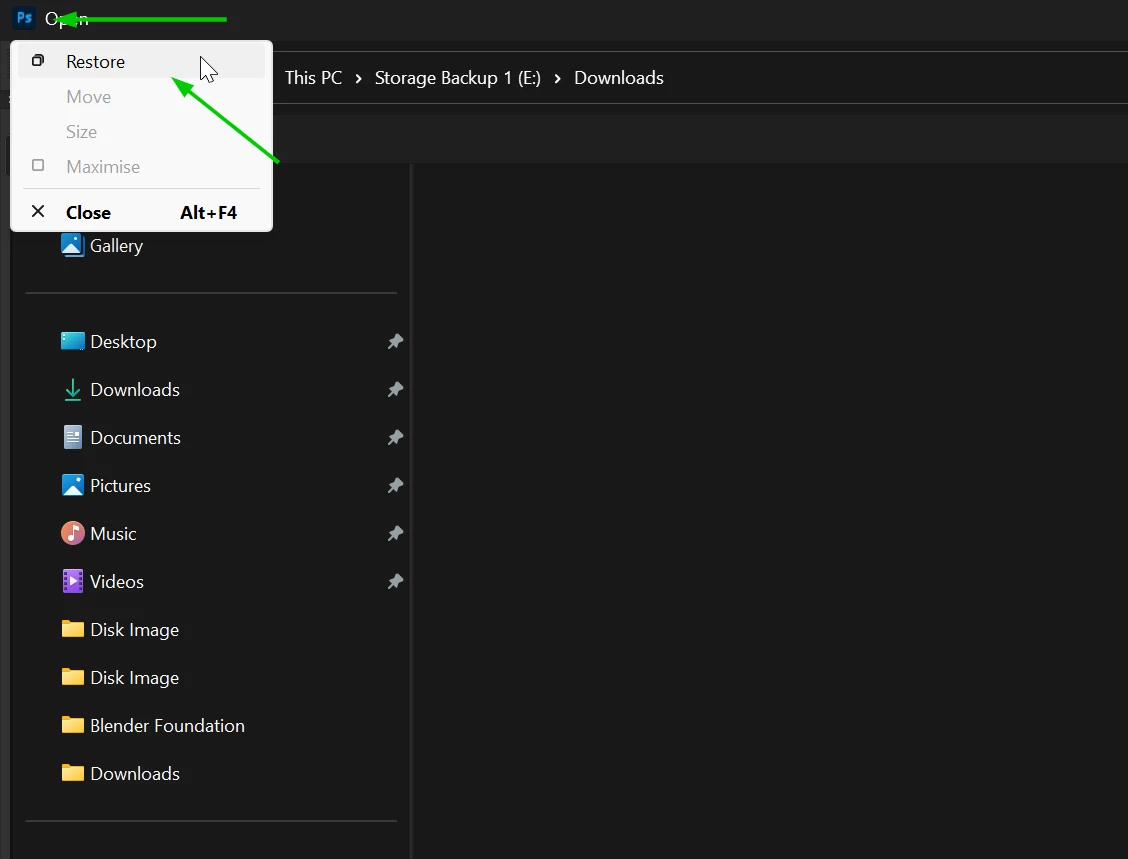
@randolph_3144 try clicking on the PS icon and selecting restore

1 reply

Ged_Traynor
Community Expert
Ged_TraynorCommunity ExpertCorrect answer
Community Expert
July 24, 2025

@randolph_3144 try clicking on the PS icon and selecting restore

Participant
July 24, 2025

Thanks for your reply. But Restore is greyed out, not active. What would this indicate?

creative explorer
Community Expert
Community Expert
July 24, 2025

@randolph_3144 I have my 'Open' Dialog box open, and I click on 'Options' to expand, and un-expand 

Or, go to the bottom right corner, and try to resize the pop-up dialog box. 

If you are totally desperate, you could reset your Photoshop preferences but it will go back to the original default settings. So, if you have workspaces saved and other preferences, you may want to make a copy of that. 


m