
Known Participant
June 24, 2024
Question

How to clear this sky?

  • June 24, 2024
  • 2 replies
  • 1045 views

Team, 


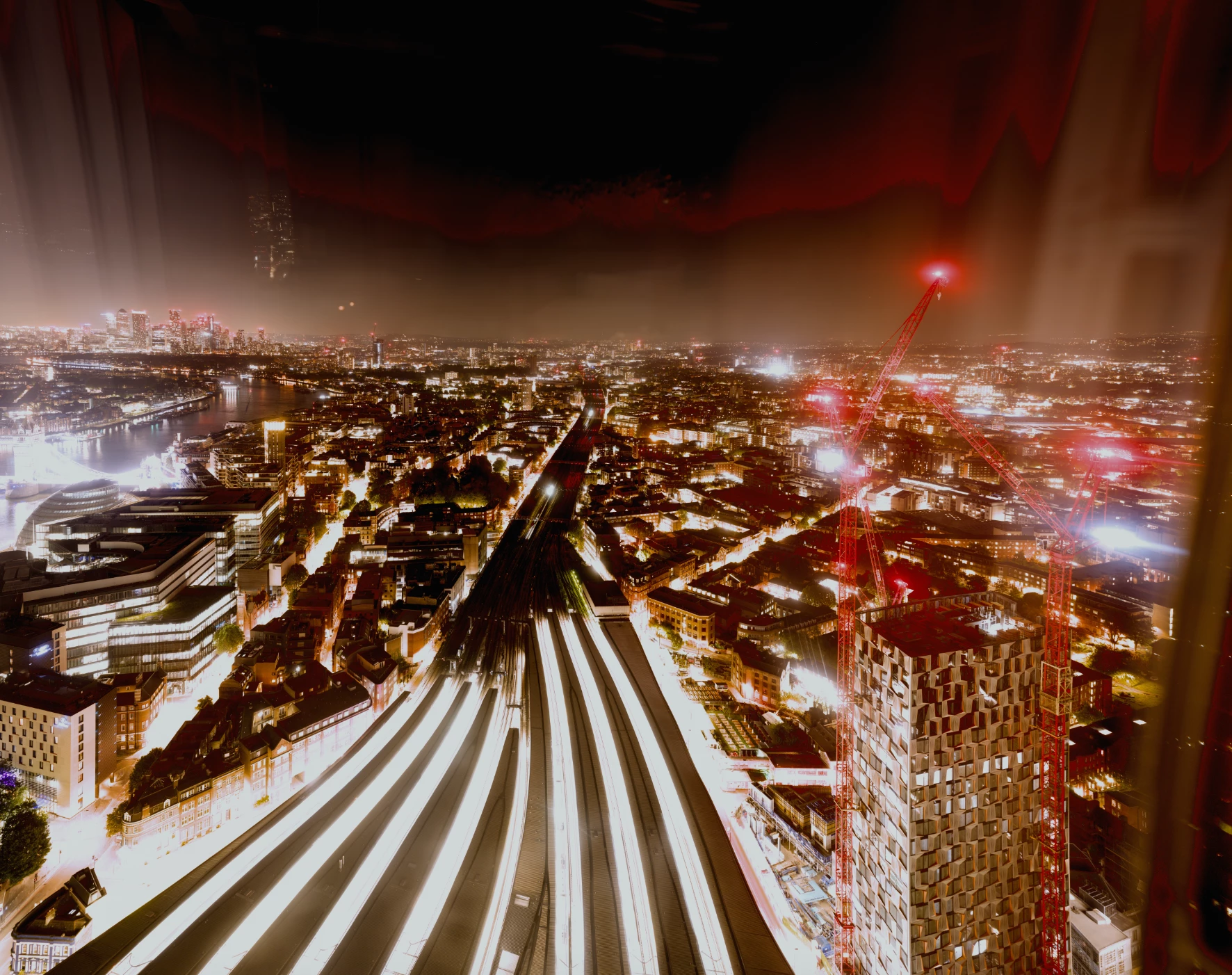
If you look at this picture, how would you get across removing the kind of 'red aurora borealis' which appeared in the screen after modifying the colour balance/exposure/vibrance of the picture?


In other words how would you get across unifying the sky look and feel while keeping the windows reflection elements, and of course not reverting back the changes on colours themselves?


Best 
Dan
 

This topic has been closed for replies.

2 replies

mglush
Community Expert
Community Expert
June 24, 2024

Do you really just want to get rid of the red in the sky? 

You can use a Hue/Saturation Adjustment layer and in the dropdown menu, change it from Master to Red, and then drad the Saturation slider down until you are satisfied. Then you can use the layer mask to fine tine exactly where you want to eliminate the reds.


Let us know if that does what you want?

Michelle

Known Participant
June 25, 2024

Thank you Michelle. I believe this is the right approach. I had a first pass at it. It sounds much promising and generates variations and effects I am most interested in. 


Conrad, thank you very much too for your suggestions. I will give it a try too. Although the picture is 20,000 pixels plus wide and way out of dimensions for geneative fill. A piecemeal approach could work. And I believe this isnt the first time you provide help on my questions. Thank you.


Have both a great rest of the week.

Best,
Dan

mglush
Community Expert
Community Expert
June 28, 2024

Thanks Dan! I am glad to hear that the process works!

Michelle

Conrad_C
Community Expert
Community Expert
June 24, 2024

There are many potential approaches to this. One is to simply select the parts of the sky with the red reflection and use Generative Fill to remove the red area and fill it in with what the rest of the sky looks like. That’s what I tried in the picture below, and although it isn’t perfect, it only took a few seconds so it won’t take much time to clean up the rest.


Another, more manual and traditional way is to add a layer mask with an adjustment layer that desaturates, and paint the desaturation into the “aurora” area to remove the red. But that might still leave a contrast difference, so a little more manual retouching (healing, replacing, patching) might be needed. This method might be preferable if you aren’t allowed to use generative AI for the final result.