
KoryLidstrom
Participant
February 6, 2025
Answered

How to convert CR2 files from a Canon 5D Mark4 using Adobe DNG converter

  • February 6, 2025
  • 1 reply
  • 597 views

Haven't used my 5d MarkIV for a couple years.  Recently went to convert some RAW CR2 files to DNG, but the converter can't see them/isn't recognizing them.  Not sure what changed, it used to work fine.  I'm using the latest DNG Converter and Windows 10.  Please help!
Correct answer Per Berntsen

The DNG converter never shows you the original raw files.

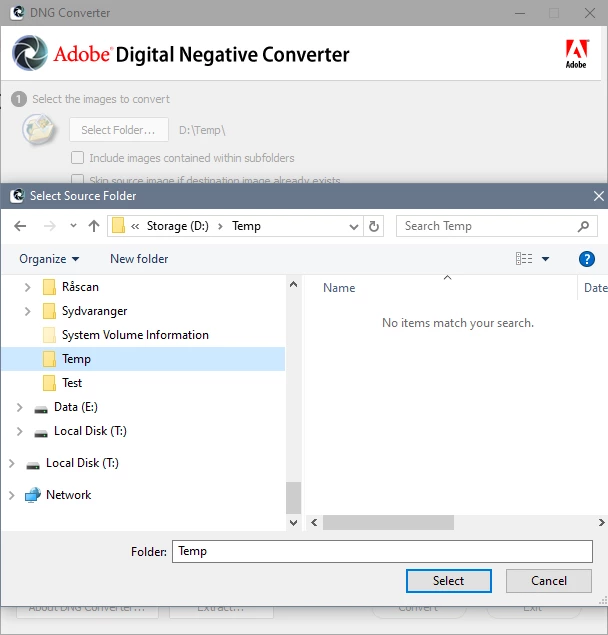
The Select folder dialog will not show you any files either, and it will say "No items match your search", which you can ignore.

Select the source and destination folders, then click Convert.

All the raw files in the source folder will be converted, and the DNGs will be saved in the destination folder.


1 reply

Rob_Cullen
Community Expert
Community Expert
February 6, 2025

One question- Are you selecting a FOLDER of images in the Converter dialog.  Selecting FILES does not work!


Regards. My System: Windows-11, Lightroom-Classic 15.1.1, Photoshop 27.3.1, ACR 18.1.1, Lightroom 9.0, Lr-iOS 10.4.0, Bridge 16.0.2 .
KoryLidstrom
Participant
February 6, 2025

No, the CR2 files aren't even showing up in the folder.  The folder is empty.  It's as if the DNG converter can't even recognize the files.

Per Berntsen
Community Expert
Per BerntsenCommunity ExpertCorrect answer
Community Expert
February 6, 2025

The DNG converter never shows you the original raw files.

The Select folder dialog will not show you any files either, and it will say "No items match your search", which you can ignore.

Select the source and destination folders, then click Convert.

All the raw files in the source folder will be converted, and the DNGs will be saved in the destination folder.