

Answered
How to customize the interface colors for this script?
https://github.com/Paul-Riggott/PS-Scripts/blob/master/Picture%20Processor.jsx
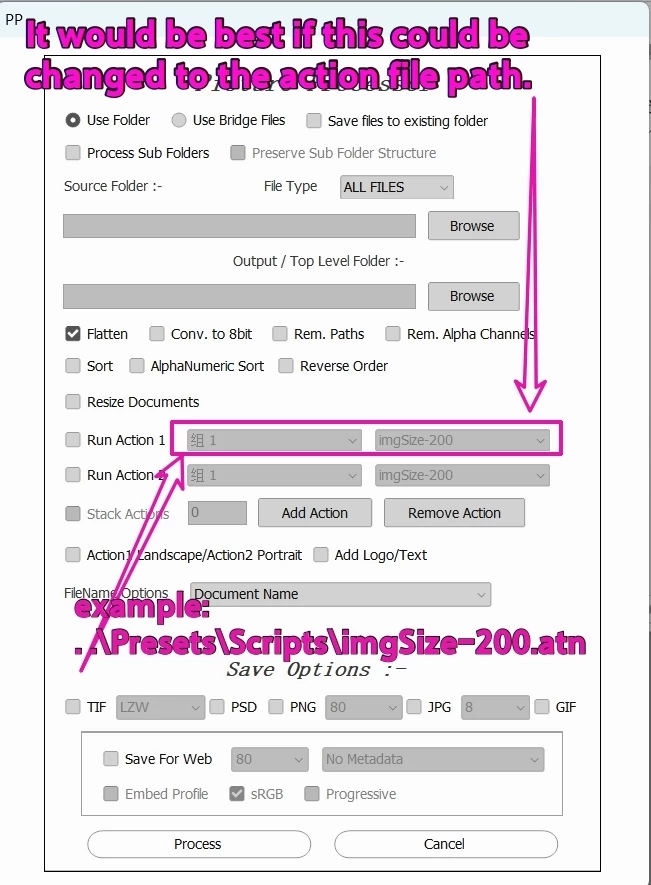
Picture Processor.jsx is a very useful script. It would be great if it could be customized the interface colors.
The default color for this script is white.
If my Photoshop interface is medium gray, the text on the script interface becomes hard to read.
In that case, I need to change the Photoshop interface to white as well.
I don’t like a white interface; I’d prefer both the script and the Photoshop interface to be medium gray, and the font color is white..
It would be great if the script’s colors could be customized.
Also, wouldn’t it be great if it could read action files by default from the same directory as Picture Processor.jsx?
Thank you very much.



 AdChoices