martinbushfu
Participating Frequently
June 4, 2025
Answered

How to disable all pop ups and tool tips?!

  • June 4, 2025
  • 6 replies
  • 2177 views

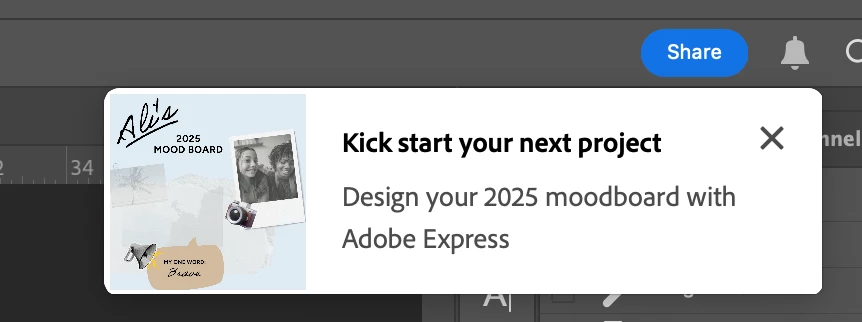
These are getting ridiculous. How to I turn these pop-ups off for good. Every time i open the app or save a file there is a pop up in my UI. This is an AD! For something totally unrelated to what i'm doing. Adobe, please, this behavior, it's insane.
Correct answer Jeff Arola

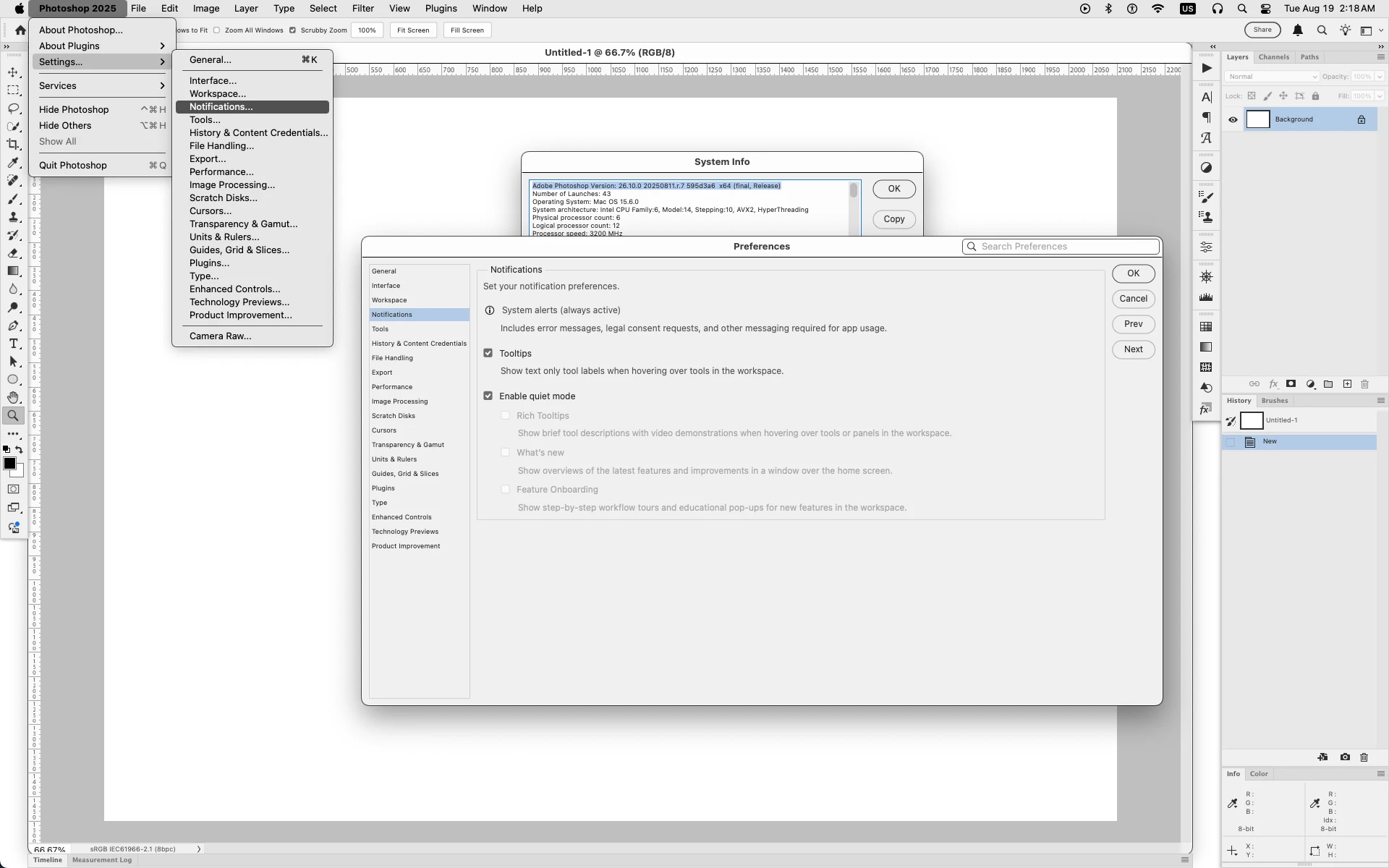
When the latest production Photoshop 2025 26.10 update shows up for you, it has a section in the preferences to Enable quiet mode.


6 replies

Jeff Arola
Community Expert
Community Expert
August 26, 2025

martinbushfu,


Your initial post was about Photoshop.


Is that what your referring to instead of Illustrator?

martinbushfu
Participating Frequently
August 26, 2025

Ah, you are right! My mistake. I am expericing pop ups in illustrator when I launch. I feel like I've turned tool tips off dozens of times at this point and they just keep coming back. 

Jeff Arola
Community Expert
Jeff ArolaCommunity ExpertCorrect answer
Community Expert
August 19, 2025

When the latest production Photoshop 2025 26.10 update shows up for you, it has a section in the preferences to Enable quiet mode.


Participant
August 26, 2025

Best feature update for many years! 🙌 Thank you for bringing us the good news, Jeff.

Participant
August 15, 2025

The solution has been removed. There's no more focus mode in the preferences. Anyone have a new solution or do we have to suffer through this distracting "feature"? I hate these windows SO much. As soon as an app starts showing needless popups I know that the problems in the app are no longer being fixed and instead the focus is on flashy new distractions that a dev can show their higher up to make it look like they have good ideas.

Jeff Arola
Community Expert
Community Expert
June 5, 2025

In addition to the great advice from Aleke, one further step you could try is going to Photoshop 2025>Settings>Technology Previews, checking Enable Focus Mode, then restarting Photoshop for the setting to take effect.


martinbushfu
Participating Frequently
June 5, 2025

Thank you Jeff!

wow, in all my googling, this never came up. Of all the features they've should me through tool tips, why not this one?!

Lol. Many thanks everyone. 

Legend
June 4, 2025

Photoshop 2024, 2025, or online? That sure looks like photoshop.adobe.com.

[fixed typo]

Photoshop online was the only Photoshop where I could find an "ad."


Larry
martinbushfu
Participating Frequently
June 5, 2025

Lol Larry, I don't know what photosjop.adobe.com is. I'm running Photoshop 2025 straight from the source. 

Community Manager
June 4, 2025

Hey @martinbushfu, totally understand how frustrating that can be.

When you get a chance, try going to Photoshop > Preferences > Tools and uncheck Rich Tooltips.

Let me know if it works for you!

Thanks so much,
Alek


*(If you mention me with an @, like @Aleke, I’ll get a notification and can respond faster.)*
martinbushfu
Participating Frequently
June 4, 2025

That box has been unchecked for me. I still get all sorts of pop ups.