
Participant
June 3, 2022
Answered

How to disable "save to creative cloud" in Save as dialog?

  • June 3, 2022
  • 1 reply
  • 8195 views

It's all in the title. Apparently there's a new patch that tries to once again force feed Creative Cloud crap on the user.

I have never used and never will use Creative Cloud to save my files, I save them locally and deal with my own backups.

And yet, every single damn time it wants to save to Creative Cloud first and I need to click "On your computer" and then use the dialog popping up from there. How do I disable it, preferrably forever.


How do I remove this intrusive, annoying step from the process? Ticking "Enable Legacy Save As" doesn't help.

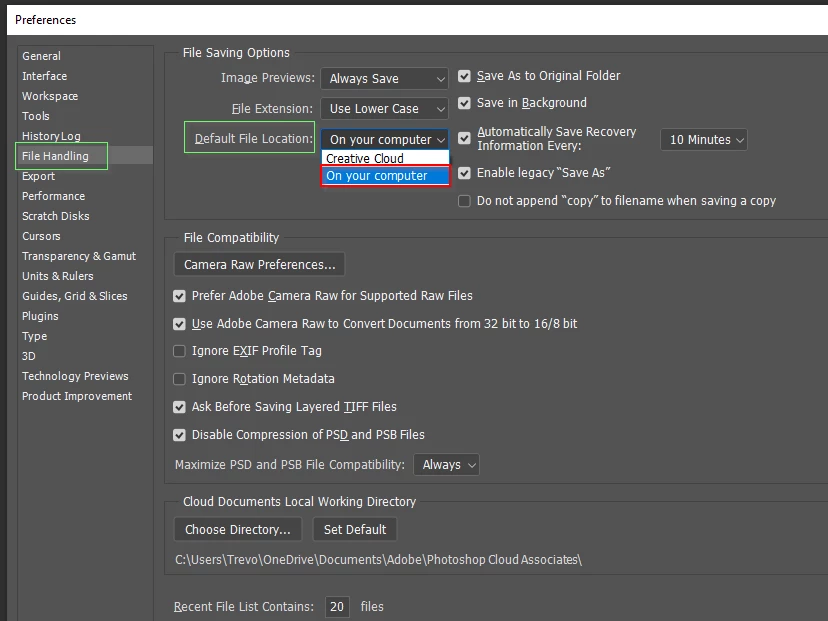
Correct answer Trevor.Dennis

Joe, it took me a wee while to find it, and it is annoying as all heck.  The default should be to save to a local drive!

1 reply

KaotikaAuthor
Participant
June 3, 2022

Nevermind, feel stupid. Found the default save location menu. Feel stupid.


But why the [Profanity removed by moderator] did it change in the first place? Updates shouldn't mess with your preferences.

joeh87907460
Inspiring
June 18, 2022

PLease tell me what you did to get rid of the "Save to creative cloud" crap. I can't find any way to disable that junk. You said you found the default save location menu. Where is it? In the preferences or hidden somewhere else? I'd appreciate your help. Thanks,

Joe

Trevor.Dennis
Community Expert
Trevor.DennisCommunity ExpertCorrect answer
Community Expert
June 18, 2022

Joe, it took me a wee while to find it, and it is annoying as all heck.  The default should be to save to a local drive!