



photophilljk
Participant
September 16, 2026
Question

How to disable the diaglog box when saving a file from an action

  • September 16, 2026
  • 2 replies
  • 21 views

Hello everyone, 

I have Photoshop version 27.10 with the new actions panel. I have created two actions and bundled them into a master action to run together.

The last action is to save the file in its current location as a tiff file (default save type) but would like to turn off the two dialogue boxes that come up showing the location and file type options and then the Tiff file options. 

Any ideas on this? All googling has resulted in the outdated versions of PS
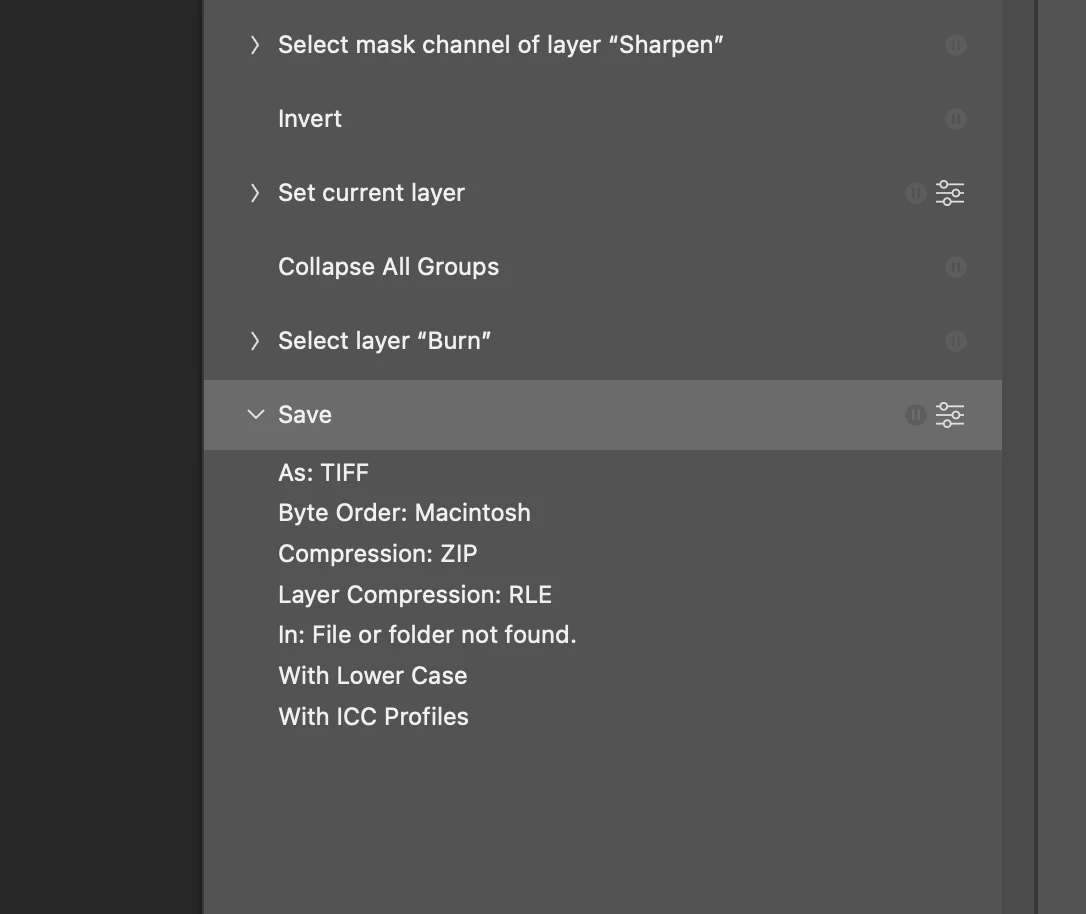
 

    2 replies

    Stephen Marsh
    Community Expert
    Community Expert
    September 16, 2026

    An action can record a "helper script” for the save step, but then the action is no longer stand-alone and has this dependency.

    Simple:


    var c2t = function (s) {
    return app.charIDToTypeID(s);
    };
    var s2t = function (s) {
    return app.stringIDToTypeID(s);
    };
    var descriptor = new ActionDescriptor();
    var descriptor2 = new ActionDescriptor();
    descriptor2.putEnumerated( s2t( "byteOrder" ), s2t( "platform" ), s2t( "IBMPC" ));
    descriptor2.putEnumerated( s2t( "encoding" ), s2t( "encoding" ), s2t( "zip" ));
    descriptor2.putBoolean( s2t( "saveTransparency" ), true );
    descriptor2.putEnumerated( s2t( "layerCompression" ), s2t( "encoding" ), s2t( "RLE" ));
    descriptor.putObject( s2t( "as" ), c2t( "TIFF" ), descriptor2 );
    descriptor.putPath( c2t( "In " ), new File( app.activeDocument.path.fsName + "/" + app.activeDocument.name.replace(/\.[^\.]+$/, '') + ".tif" ) );
    descriptor.putInteger( s2t( "documentID" ), 82 );
    descriptor.putBoolean( s2t( "lowerCase" ), true );
    descriptor.putEnumerated( s2t( "saveStage" ), s2t( "saveStageType" ), s2t( "saveSucceeded" ));
    executeAction( s2t( "save" ), descriptor, DialogModes.NO );


    More robust:


    /*
    TIFF Save As to Source Directory.jsx
    Stephen Marsh
    v1.0 - 16th September 2026
    https://community.adobe.com/questions-712/how-to-disable-the-diaglog-box-when-saving-a-file-from-an-action-1642176
    Adapted from "JPEG Save As a Copy to Source Directory.jsx" to save TIFF instead.
    https://community.adobe.com/t5/photoshop-ecosystem-ideas/saving-jpegs-via-an-action/idc-p/15002989
    */

    #target photoshop

    if (app.documents.length) {

    /*
    // Check if the bit depth is 32 bpc
    if (app.activeDocument.bitsPerChannel == BitsPerChannelType.THIRTYTWO) {
    //throw alert("Script cancelled!\rThe image mode is 32 bpc, tone mapping to 8 or 16 bpc is required before continuing.");
    mergeHDRto8bit(8, 6, 0, 1, false);
    }
    */

    var docName = app.activeDocument.name.replace(/\.[^\.]+$/, '');

    var docPath;

    try {
    // Use the previously saved path
    docPath = app.activeDocument.path;
    } catch (e) {
    // If unsaved, only prompt for an output folder once per Photoshop session.
    // $.global persists between script runs (e.g. across an Action or a batch of
    // unsaved documents) until Photoshop quits or the ExtendScript engine restarts.
    if (!$.global.tiffOutputFolder || !$.global.tiffOutputFolder.exists) {
    $.global.tiffOutputFolder = Folder.selectDialog("Unsaved base file, select the output folder:");
    // User cancelled the folder picker
    if (!$.global.tiffOutputFolder) {
    throw null;
    }
    }
    docPath = $.global.tiffOutputFolder;
    }

    // File Path & Naming
    var nameAndPath = new File(docPath + '/' + docName + '.tif');

    if (nameAndPath.exists) {
    // true = 'No' as default active button
    if (!confirm("File exists, overwrite: Yes or No?", true))
    // throw alert("Script cancelled!");
    throw null;
    }

    saveTIFF(nameAndPath);

    } else {
    alert("You must have a document open!");
    }


    function saveTIFF(saveDetails) {
    var tiffOptions = new TiffSaveOptions();
    tiffOptions.imageCompression = TIFFEncoding.TIFFZIP;
    tiffOptions.byteOrder = (Folder.fs === "Windows") ? ByteOrder.IBM : ByteOrder.MACOS;
    tiffOptions.layers = true;
    tiffOptions.layerCompression = LayerCompression.RLE;
    tiffOptions.transparency = true;
    tiffOptions.embedColorProfile = true;
    app.activeDocument.saveAs(saveDetails, tiffOptions, false, Extension.LOWERCASE); // true for save a copy
    }

    function mergeHDRto8bit(depth, version, exposure, gamma, deghosting) {
    var s2t = function (s) {
    return app.stringIDToTypeID(s);
    };
    var descriptor = new ActionDescriptor();
    var descriptor2 = new ActionDescriptor();
    descriptor.putInteger( s2t( "depth" ), depth );
    descriptor2.putInteger( s2t( "version" ), version );
    descriptor2.putEnumerated( s2t( "method" ), s2t( "hdrToningMethodType" ), s2t( "hdrtype2" ));
    descriptor2.putDouble( s2t( "exposure" ), exposure );
    descriptor2.putDouble( s2t( "gamma" ), gamma );
    descriptor2.putBoolean( s2t( "deghosting" ), deghosting );
    descriptor.putObject( s2t( "with" ), s2t( "hdrOptions" ), descriptor2 );
    executeAction( s2t( "convertMode" ), descriptor, DialogModes.NO );
    }


    1. Copy the code text to the clipboard
    2. Open a new blank file in a plain-text editor (not in a word processor)
    3. Paste the code in
    4. Save as a plain text format file – .txt
    5. Rename the saved file extension from .txt to .jsx
    6. Install or browse to the .jsx file to run (see below)

    https://prepression.blogspot.com/2017/11/downloading-and-installing-adobe-scripts.html

    Stephen Marsh
    Community Expert
    Community Expert
    September 16, 2026

    This is a hack to save in the same location, which isn't a standard feature of actions, but is something that a script is designed to do. I believe that this is forcing the dialog to open.