
Known Participant
January 6, 2025
Answered

How to download Neural Filter in My Photoshop?

  • January 6, 2025
  • 2 replies
  • 5744 views

Hi,


I am using Adobe Creative Cloud which includes Photoshop 21.2.12 Release. I find this guide https://helpx.adobe.com/photoshop/using/neural-filters.html


But in my photoshop, there is no Neural Filter, see below:
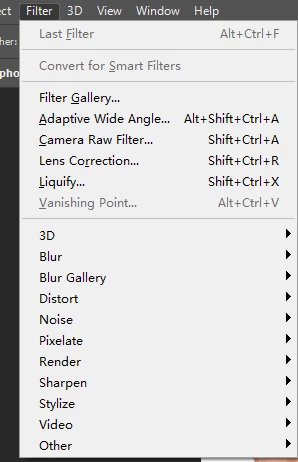
 

So, how to get it. It seems that I need to download it but I cannot find detailed instructions on that. 


Thank you very much.

This topic has been closed for replies.
Correct answer Myra Ferguson

Neural Filters were released with Photoshop 22.0. If you're using Photoshop 21.2.12, try updating Photoshop so that you can access that feature. The current version of Photoshop is 26.2.

2 replies

tonymort
Participant
January 29, 2026

Neural filters only work with 8 bit files

No to image/mode/rgb\8bit

Myra Ferguson
Community Expert
Myra FergusonCommunity ExpertCorrect answer
Community Expert
January 6, 2025

Neural Filters were released with Photoshop 22.0. If you're using Photoshop 21.2.12, try updating Photoshop so that you can access that feature. The current version of Photoshop is 26.2.

ccw123Author
Known Participant
January 7, 2025

Hi, Myra


Thank you. Is the Neural Filter available in the Web version of Photoshop? My computer is installed WIndows 7 and it does not allow me to upgrade to PS 26.2