
Known Participant
November 26, 2025
Answered

How to draw a gradient ONLY on selected layer?

  • November 26, 2025
  • 1 reply
  • 815 views

Hi folks,


This is a super basic question (I'm only a very occasional Photoshop user!).


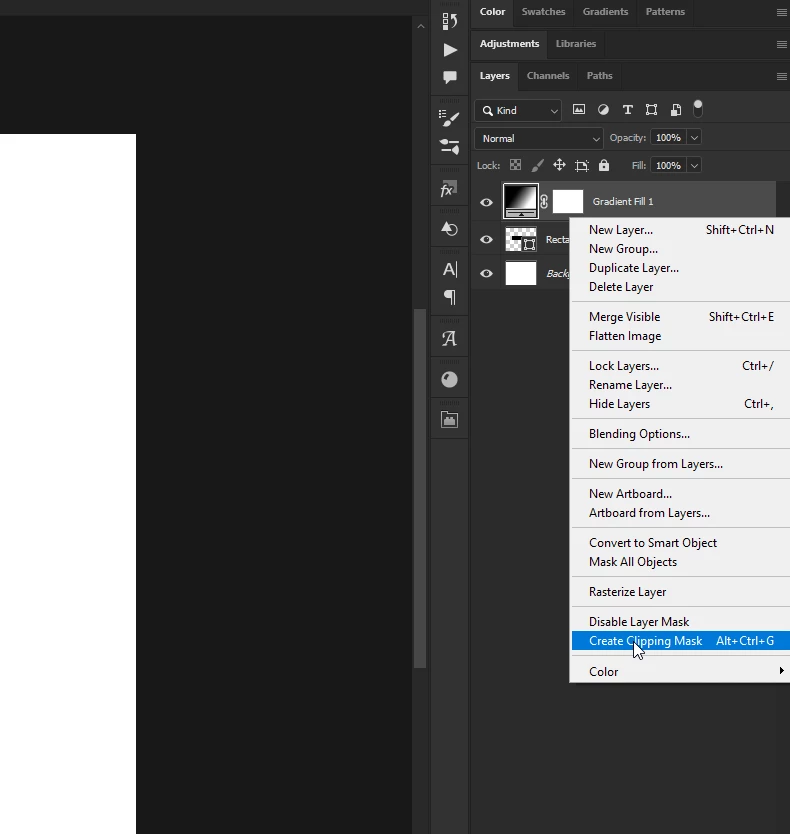
Please check the video below. I want to draw a gradient only on the selected layer, but when i click and drag, it creates a gradient layer above.


How can i draw a gradient only on the selected layer?


Thanks!
 

Correct answer Ged_Traynor

@Daz V right-click on the gradient layer and then select create clipping mask

1 reply

Ged_Traynor
Community Expert
Ged_TraynorCommunity ExpertCorrect answer
Community Expert
November 26, 2025

@Daz V right-click on the gradient layer and then select create clipping mask

Daz VAuthor
Known Participant
November 26, 2025

Thanks!


And is it possible to somehow first set up the clipping mask before i draw in the gradient?


So that when i draw it, it only applies to the layer?....... instead of me first drawing the gradient, having something that looks wrong, then fix it with the righ-click > create clipping mask action you explained?

Daz VAuthor
Known Participant
November 26, 2025

Wait, i found that solution (first create new layer, then right click > create clipping mask)


But that leads to a new question: in the video below, i draw in the gradient as i want, only on the layer.


But now i don't see the gradient handles that i had in my first video. So in that vid, i could have clicked on each of the small round circle handes, and set the color there, but now i don't see any handles nor any line .... and i also can't grab the handles and adjust the gradient after the fact.


Any ideas and sorry for my total noobiness!?


(and an aside question: is it correct that after you make a post, you can't edit it? Unlike most internet forums, i don't see any "edit" option with each of my posts)