


Participant
January 4, 2020
Answered

How to draw an arrow in photoshop version 21.0.2

  • January 4, 2020
  • 8 replies
  • 72964 views

Hi, I recently upgraded my photoshop creative cloud to version 21.0.2. After the upgrade I can't find where the arrow tool is to draw an arrow. Can someone tell me where to find the arrow tool?

Correct answer gener7

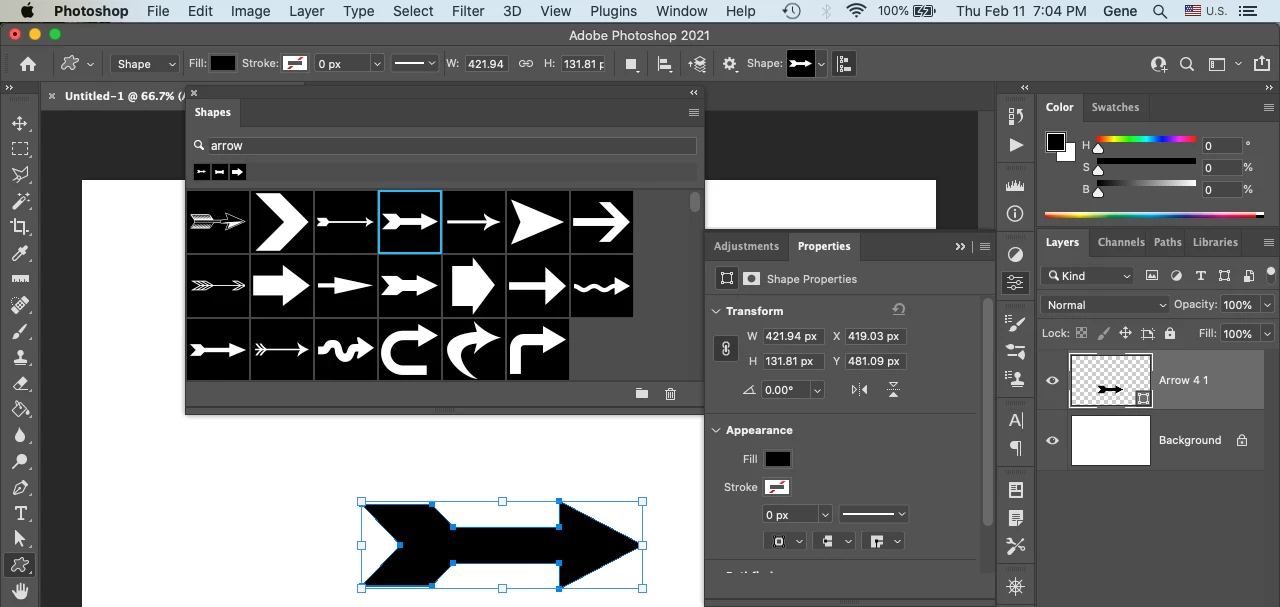
The answer is still good. Go to Window > Shapes to bring up the Shapes Panel. In the Search box, type "arrows" and it will bring up the folder with the arrows in it. Select the Arrow folder and clear the search box to display the arrows as shown. You'll need to select the Custom Shape Tool and select the arrow you want. Current as of Ps 2021/version 22.2


8 replies

Participating Frequently
August 2, 2022

The so-called "2 correct answers" below are either total b.s. or (as usual) totally out of date.


As of August 2, 2022 anyway, Adobe in its "wisdom" has either obliterated "legacy shapes" or decided to cleverly re-hide them somewhere else.  They are UNOBTAINABLE.  What I detest about the web it that obsolete, wrong information sits everywhere there, forever . . . creating a sort of Virtual Altzheimers which plague all of us.  A pox on Adobe's house.

Inspiring
August 2, 2022

Well, it still works in my PS 22.5.8 release.

I go to the Window entry on the menu bar, then klick on Shapes in the drop down.

Now the Shapes window is displayed. In the list I cannot see legacy shapes, only an empty folder. No arrows either.

But...

... I can delete that empty folder, then open the menu and select Legacy Shapes and More. Now two folders are back, All Legacy Default Shapes and 2019 Shapes. The former contains arrows.


So, at least from my point of view, all is fine with the answers. It might be different for you. It might not.

In any case, you should maybe not expect people to come back to their old community forum entries to check whether these are still valid. You can see the date, you can draw conclusions. This is not a wiki nor Adobe's documentation pages. Be angry if you have to, but please try not to insult others by calling their honest attempt to help b.s. Thank you!

Participant
February 24, 2021

I have been using PhotoShop to edit schematics and line drawings for years and have had absolutely no problems drawing lines with arrowheads on them until this recent upgrade.  I've been reading all of the responses from the other frustrated users and have tried following the directions.  When I get to the shapes panel, I typed in "arrows" and I see three folders (all opened) with nothing in them except empty folders.  How the heck is one supposed to draw or choose an arrow from nothing?  If it isn't broke, don't fix it!  

gener7
Community Expert
Community Expert
March 31, 2021

Have you deleted "arrows" from the search box? You should then see the arrows.

gener7
Community Expert
gener7Community ExpertCorrect answer
Community Expert
February 12, 2021

The answer is still good. Go to Window > Shapes to bring up the Shapes Panel. In the Search box, type "arrows" and it will bring up the folder with the arrows in it. Select the Arrow folder and clear the search box to display the arrows as shown. You'll need to select the Custom Shape Tool and select the arrow you want. Current as of Ps 2021/version 22.2


Trevor.Dennis
Community Expert
Community Expert
February 12, 2021

Gene, you have just given me a useful heads up.   I've been completely missing that search option!  

How are things btw?

gener7
Community Expert
Community Expert
February 12, 2021

Coming along, Trevor. Details in PM.


Gene

Dio Vayne
Known Participant
February 3, 2021

Wow. This is truly weird. I used to draw arrows all the time. Simply click the line-tool > adjust the width > add arrowhead at then end and Bob's your uncle. Now I can only manage to get the arrowhead. The line itself won't get a width, fill or stroke. Am I missing something here?

Participant
February 12, 2021

Found it!!!

Line tool.

In tool menu go to seetings gear icon

choose line width in pixels

select arrowheads box for either start or end

adjust arrowhead height and width

draw the line.

Whew!


That took me WAY longer than it should have to figure out!!

Participating Frequently
February 26, 2021

Shows the line getting thicker but then it disappears when you click off? 
And can only be 3px wide? 😞

Participant
December 24, 2020

Can you please update your answer? I'm trying to find out where to find the arrows just like all the other people on here. Your solution is not working. Please advise a solution that works. 

yimyambo
Participant
December 24, 2020

I had to search because I have a Dutch version, but I found it and it works like explained. Not like it used to be and I agree with people saying Adobe give us the old way back. But for now at least I have arrows.

Hopefully this helps for people asking how to choose an arrow:
You pick an arrow and slide it on your document. You can it reshape it like a pasted image.

yimyambo
Participant
December 24, 2020

Too bad I can't edit the post. I meant to say "you can reshape it like any pasted image."

Participant
November 23, 2020

This is an AWFUL solution. I use arrows all the time to point out corrections to my developers and it is EXTREMEMLY inconvenient to have to use a SHAPE to accomplish this.


Please put it back to the way it used to be.

Participant
November 23, 2020
I whole heartedly agree! I still cant figure out how to use the shape.
gener7
Community Expert
Community Expert
January 4, 2020

Arrow shapes have been moved to a new folder "Legacy Shapes and more..." You access them by going to Window > Shapes and if you do not see it in the panel, load them from the Panel menu

Arrrow shapes will be in the Arrows subfolder and should be in the Options bar picker as well.


Participant
January 4, 2020

gener7,

thanks that's exactly what I was looking for. Thank you 🙂

Mohammad.Harb
Community Expert
Community Expert
January 4, 2020

Use the line tool in the shape tools, from the option bar you can add arrow heads, or you can use the custom shape tool and select the predefined arrows 

k.schuster
Participant
January 13, 2022

It used to be so clean and easy, just as you described... basically open line tool, pop an arrow head on it, elongate or compress it, cursor on your work and drag. 10 seconds tops. It certainly is not like that now. What a mess!