Kaladdune
Participating Frequently
February 18, 2024
Answered

How to export with layer name when "Export layers to files"

  • February 18, 2024
  • 2 replies
  • 2064 views

Hello everyone, how to export only with layer name when 'export layers to files'. Its automatically adds prefix numbers. I just want to export only with layer names. I tried to change some scripts in Presets/Scripts/Layer Comps To Files.jsx " but it didn't work. 

Correct answer Stephen Marsh

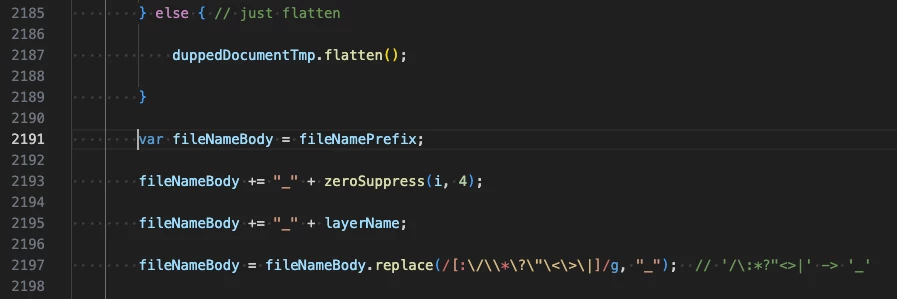
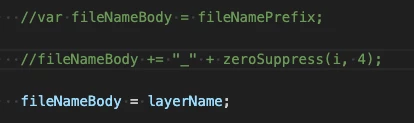
You can make the following edits to the "Export Layers To Files.jsx" script... Backup the original script just in case you need to revert!


From:
To:
 

In more detail...


Comment out (disable) the two lines as shown by adding a double forward slash //


Change –


fileNameBody += "_" + layerName;


To –


fileNameBody = layerName;


Restart Photoshop. Enjoy your layer names!


A related topic here:

https://community.adobe.com/t5/photoshop-ecosystem-discussions/export-layers-to-files/m-p/12314369


 

2 replies

Stephen Marsh
Community Expert
Stephen MarshCommunity ExpertCorrect answer
Community Expert
February 20, 2024

You can make the following edits to the "Export Layers To Files.jsx" script... Backup the original script just in case you need to revert!


From:

To:


In more detail...


Comment out (disable) the two lines as shown by adding a double forward slash //


Change –


fileNameBody += "_" + layerName;


To –


fileNameBody = layerName;


Restart Photoshop. Enjoy your layer names!


A related topic here:

https://community.adobe.com/t5/photoshop-ecosystem-discussions/export-layers-to-files/m-p/12314369

 

Kaladdune
KaladduneAuthor
Participating Frequently
February 23, 2024

Thank you so much. I handled the situation in a different way. But I will try this method

Stephen Marsh
Community Expert
Community Expert
February 20, 2024

@Kaladdune 


Alternative Options:


1) Use Adobe Bridge or another tool to Batch Rename the files, removing the unwanted text (unfortunately, this adds an extra step)


2) Right-click on selected layers in the layers panel and use "Export As" if you only need PNG/JPEG/GIF


3) Use alternative scripts:


https://github.com/Paul-Riggott/PS-Scripts/blob/master/Layer%20Saver.jsx

https://github.com/Paul-Riggott/PS-Scripts/blob/master/Layer%20Saver%20Plus.jsx


Otherwise, one is left with editing the Adobe script, which as you have found is complex.


P.S. This isn't a bug.

